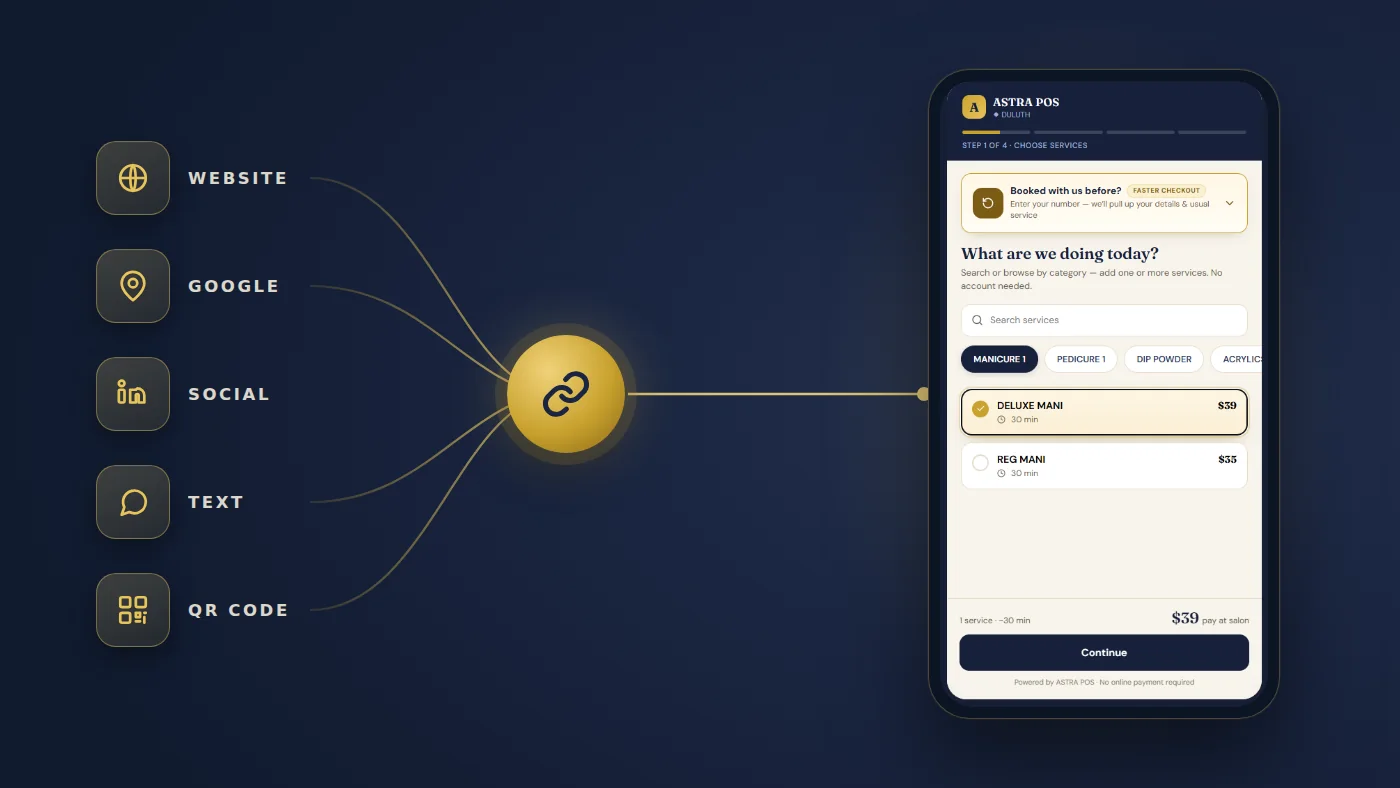
Online booking works best when customers don't have to hunt for the right page or create an account just to request an appointment. Here is how one booking link works, where to put it, and what happens after a customer taps confirm.
Online booking works best when customers don't have to search for the right page or create a complicated account just to request an appointment. With Astra POS, each participating merchant receives a dedicated online booking URL for their business — one address the salon can put wherever customers already are.
That single detail changes more than it sounds like it should. The salon doesn't need one booking system for Google, a different one for its website and a third for social media. There is one destination, and every channel points at it.
A salon online booking link is a dedicated web address that belongs to one business and opens that business's own booking experience. Because it is just a URL, it can live anywhere a link can live:
This creates one consistent destination for customers who are ready to make an appointment — and one place to update if anything about the salon's services or availability changes.
Imagine a customer searching Google for a nail salon near her. She finds the salon's Google Business Profile, looks through the photos and reviews, and decides she wants to schedule a service.
Instead of having to call the salon, she can select the salon's online booking option. That link opens the merchant's Astra POS booking experience, and she is guided through a short appointment process.
The objective is to collect the information necessary to schedule the visit without turning booking into a long registration process. Depending on the salon's configuration, the flow covers the choices that actually matter — the desired service, technician preference, date and available time, and the contact information needed to complete the reservation. Once everything is reviewed and confirmed, the customer submits the appointment.
This is the actual Astra booking flow a customer sees on her phone after tapping the salon's link. For the owner-side settings behind it, see Astra salon online booking.
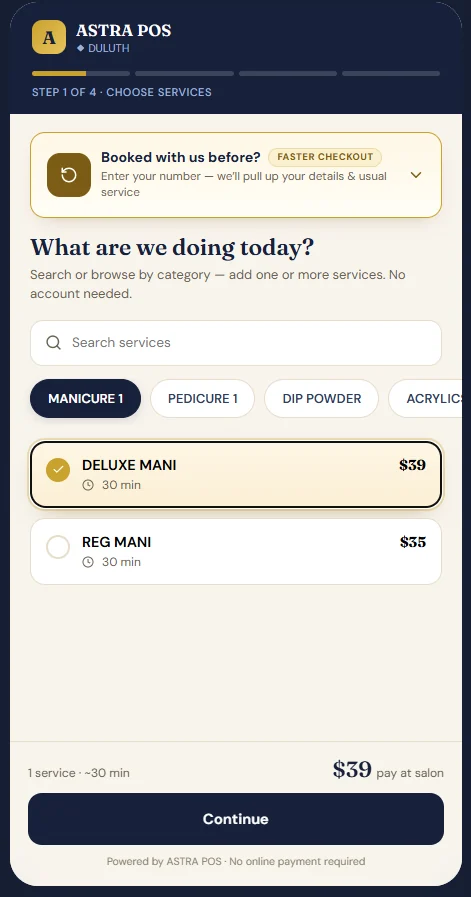
Search or browse by category and add one or more services. Prices and durations are shown as she goes, and a returning customer can enter her phone number to pull up her usual service.
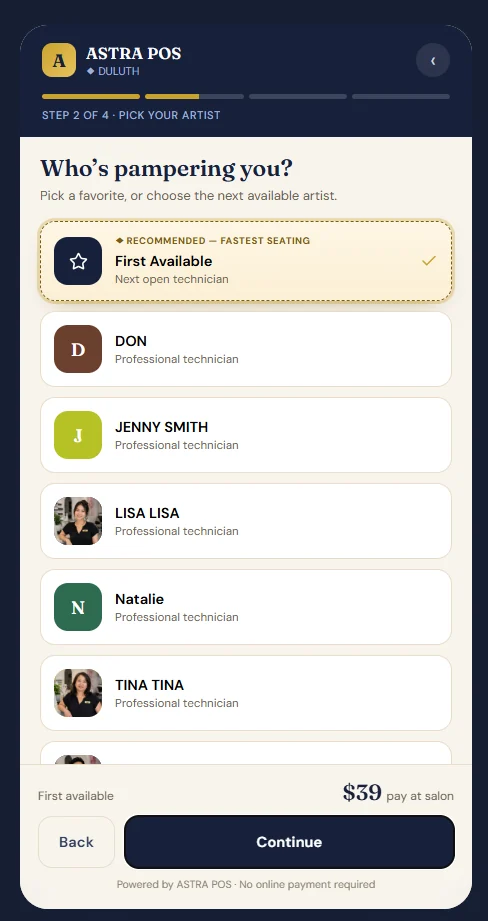
She can ask for a favorite by name, or take First Available for the next open technician — the option that usually gets her seated soonest.
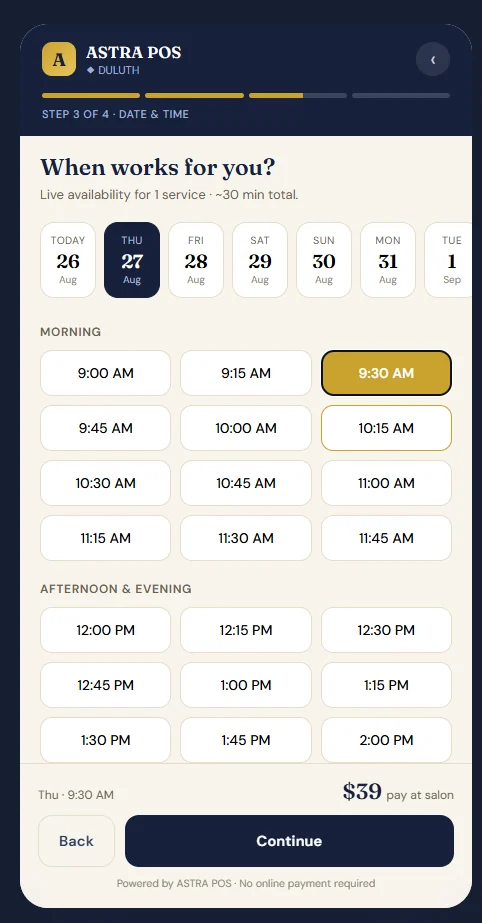
Live availability for the services she picked, laid out by day and grouped into morning and afternoon, so she is only ever choosing from times the salon can actually serve.
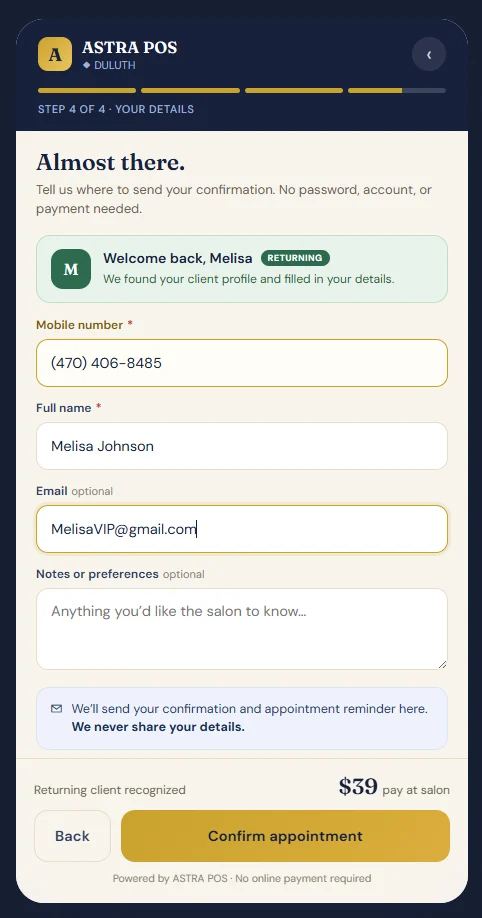
A mobile number and a name, so the salon can send the confirmation. Email and notes are optional. A returning client is recognized and her details are filled in already.
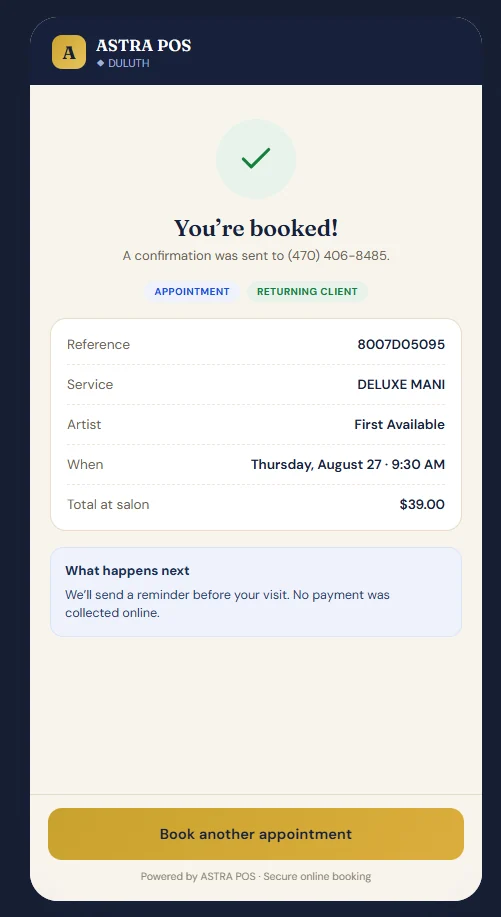
Customers can move from discovering the salon to requesting or confirming their appointment through a guided online experience — no password and no account to create. In the flow shown above, no payment is collected online either.
One of the strongest advantages of giving each merchant a dedicated booking URL is flexibility. The same booking destination can be used across every channel the salon already uses.
The booking URL can sit behind buttons such as Book Appointment, Book Online or Schedule Your Visit — in the site header, on the homepage, on individual service pages and on the contact page. If you are building or refreshing the site itself, our salon website design service handles that placement.
Google is often the first place a new customer encounters a salon. Someone searching nail salon near me or pedicure near me may discover the business through Maps. Giving that customer a direct route from the listing to booking removes several steps from the journey:
The same URL works when promoting services on Facebook, Instagram or anywhere else. A customer who sees a manicure or pedicure post can move from interest to a booked appointment without having to go find the business again.
Astra POS salon text messaging complements online booking. Where appropriate, salons can send customers the booking link directly, and messaging keeps supporting the appointment afterwards through confirmations, reminders and other relevant communication. That is a connected customer journey rather than marketing, scheduling and communication living in three separate systems.
Because it is a URL, the booking link can be turned into a QR code for a window decal, a business card, a service menu or a flyer — giving walk-by traffic a way to book for later without stopping in.
One Astra booking destination can connect customers back to the salon's appointment system.
A salon can use its Astra online booking URL as an appointment destination from its Google Business Profile where Google's applicable booking-link features are available. What a business is able to add to its profile is determined by Google, and the available fields can differ by location and business category — so it is worth checking what your own profile offers.
The reason it is worth doing is simple: a customer who has already read your reviews and looked at your photos is as close to booking as she will ever be. Every extra step between that moment and a confirmed appointment is a chance for her to give up or call a competitor instead.
If you are actively working on that listing, our guide to getting more Google reviews covers the other half of the same profile.
A major benefit of connecting online booking with the front-desk POS is that employees don't have to manually transfer an online request into a separate appointment book. After the customer successfully books:
Depending on how the salon has it configured, a booking can also arrive for the front desk to review — and adjust the time or technician if needed — before it is confirmed. Either way the customer gets the convenience of booking online while the merchant keeps managing appointments from the same front-desk environment used during normal salon operations. Nothing is re-keyed, and there is no second calendar to reconcile at the end of the day.
Watch a booking travel from a customer's phone to your front desk — and into the rest of the visit.
One of the principles behind the Astra POS online booking process is simplicity. Customers generally don't want to fill out a lengthy form before they can even see whether the salon has an appointment available.
They are trying to accomplish something very specific: I want to book a service. The booking experience should help them do that as efficiently as possible.
A guided four-step process keeps the customer focused on completing the appointment instead of facing a large form full of unnecessary questions. Each step answers one part of the booking decision and leads naturally to the next, and at the end the customer reviews the appointment and confirms it. It won't fill a calendar on its own, but it does help make it easier for customers to book — and it reduces the friction between discovering the salon and scheduling a visit.
The online booking process is only the beginning of the salon visit. Once the appointment enters Astra POS, the salon can continue managing that customer through the rest of the workflow.
When appointment day arrives, the customer can enter the salon and use the Astra POS Check-In Tablet. Because the appointment already exists, the system can recognize the scheduled visit and move the customer through the appropriate arrival process. She then appears in Client Arrival for the merchant or front-desk staff, exactly as she would if she had walked in without a booking.
That is the important distinction between simply offering an online calendar and connecting online booking to the everyday operation of the salon. The information doesn't stop at the booking page. It follows the customer into the salon.
The arrival half of this journey is covered in detail in our guides to the salon customer check-in process and to managing nail salon walk-ins. Booked visits and walk-ins meet at the same front desk, so the two are worth reading together.
Put end to end, one online booking touches discovery, scheduling, communication, the front desk and checkout — without the customer ever seeing the machinery.
The customer and the salon are looking at the same appointment from opposite sides. Each should only ever see their own half.
The technology connecting those two experiences should stay mostly invisible to the customer. She should not have to think about which system the salon runs, whether her booking made it through, or what happens between confirming and walking in the door. She should just get a confirmation, a reminder, and a chair when she arrives.
It is a dedicated web address for a single salon that opens that salon's own online booking experience. Because it is just a URL, the salon can place it anywhere customers already are rather than maintaining a separate booking tool for each channel.
A salon can use its Astra online booking URL as an appointment destination from its Google Business Profile where Google's applicable booking-link features are available. What a business can add to its profile is determined by Google and can vary by location and category.
No. The Astra booking flow asks for a mobile number and a name so the salon can send a confirmation. There is no password to create and no account to register.
In the booking flow shown on this page, no online payment is collected: the running total is presented as the amount to pay at the salon, and the confirmation states that no payment was collected online. Deposit requirements are a salon-level setting, so confirm how your own booking page is configured.
When the customer confirms, Astra POS receives the appointment and notifies the front desk, and the appointment is added to the salon's appointment schedule. Staff manage it from the normal Astra POS appointment workflow rather than re-entering it by hand.
Yes. One booking destination can sit behind a Book Appointment button on the salon's website, on social profiles and posts, inside text messages and email, and behind a QR code on printed material.
If your salon already has an Astra booking URL, the highest-value thing you can do this week is make sure it is actually reachable from the three places customers look first: your Google Business Profile, the button in your website header, and the link in your social bios. Everything else — QR codes, email, printed menus — is upside on top of that.
And once bookings start arriving on their own, the follow-on work shifts to keeping them: reducing appointment no-shows, and giving the people who do show up a reason to come back through your salon loyalty program.
Astra POS builds point-of-sale and salon management software around the way salons actually run — online booking, appointments, walk-ins, customer check-in and Client Arrival, technician turn management, client messaging, checkout, payroll, gift cards and loyalty in one system. The screenshots on this page are the live Astra booking flow. Booking-link placement options on third-party platforms such as Google are controlled by those platforms and can change; check what your own business profile currently supports.
Connect online booking, appointments, customer check-in, technician management, SMS communication, checkout and loyalty in one salon workflow.