Walk-ins are opportunity and chaos in equal measure. Here is how to organize arrivals, quote wait times you can keep, communicate while people wait, and carry one visit cleanly from the front door to the register.
Walk-in customers are an important part of the nail salon business. A client may notice your salon while shopping nearby, stop in during a lunch break, decide at the last minute that she wants a pedicure, or walk through the door because a friend recommended your business. For a salon owner, every one of those walk-ins is an opportunity.
But walk-ins can also create one of the most difficult front-desk challenges in a busy salon. Who arrived first? What service does the customer want? Did she request a technician? Which technician is available? How long has she been waiting? Does she have an appointment that the receptionist didn't notice? What happens when several people arrive at once?
And after the service is finished, the front desk has another challenge: identifying the customer, confirming the technician and services performed, calculating the ticket, applying loyalty rewards, and collecting payment.
A good walk-in management process should make all of this easier. The goal isn't simply to create a digital waiting list. The goal is to create a connected customer journey from the moment someone enters the salon until the moment the final payment is completed.
Unlike many appointment-only businesses, nail salons often serve a combination of scheduled appointments and spontaneous walk-ins. On a quiet Tuesday morning, managing that manually may be easy. Saturday afternoon can be completely different.
Imagine three customers arriving within five minutes. One has a 2:00 PM appointment with Tina. Another is a returning customer who doesn't have an appointment and wants a pedicure with the first available technician. The third is a new customer who wants a full set and doesn't know any of the technicians.
At the same time, technicians are finishing services at different times and other customers are already waiting. A receptionist trying to remember all of this mentally — or writing names on paper — can easily make a mistake.
A customer can be overlooked. A technician can receive the wrong turn. An appointment can be mistaken for a walk-in. A client may wait longer than expected without receiving an update. These small problems affect the customer experience.
Good walk-in management creates structure before the salon gets busy.
Customers understand that a busy salon may have a wait. What is frustrating is not knowing what is happening. Being told “about 15 minutes” and then sitting for 40 minutes without an update feels very different from being given a realistic expectation and being kept informed.
That is why reducing perceived wait time is just as important as reducing actual wait time. A better process answers several questions quickly:
When that information is organized, the front desk can spend less time trying to reconstruct what happened and more time taking care of customers.
One of the easiest ways to create confusion is to use different arrival processes for different customers. An appointment customer tells the receptionist her name. A walk-in writes her name on a clipboard. Another customer tells a technician directly. Someone else sits down assuming the staff already knows she has arrived.
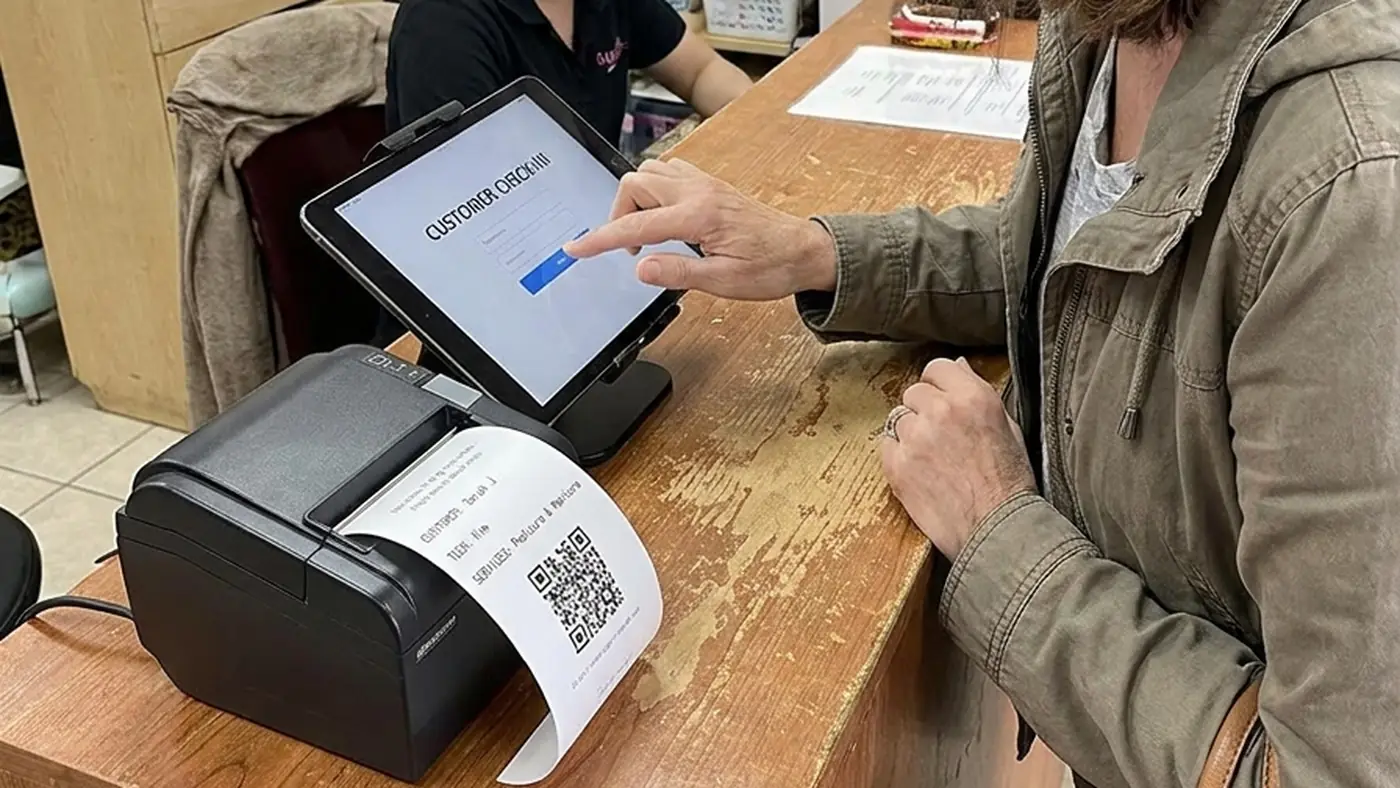
A better approach is to establish one clear starting point. At Astra POS, we've designed the customer arrival workflow around a dedicated Check-In Tablet. Whether someone has an appointment or is walking in without one, the visit can begin at the same place. The customer checks in on the tablet, and the system determines what should happen next based on the information available.
This helps eliminate one of the most common front-desk questions: “Are you an appointment or a walk-in?” The technology can help determine that instead.
If you want the front-desk detail — identification, new customer registration, the tablet setup itself — our companion guide walks through the salon customer check-in process step by step.
Not every person walking through the door needs the same check-in experience. A salon typically encounters three common situations.
If the customer's information matches an appointment, the system can recognize the scheduled visit. Instead of making the receptionist search through the appointment book, the customer's existing appointment information can become part of the arrival process.
A returning customer may simply decide to walk in. Because the customer already has a profile, the salon doesn't need to treat that person like a brand-new visitor. The customer can move through the walk-in process, identify the desired service and indicate a technician preference when appropriate.
A first-time visitor requires additional information. Rather than having the receptionist manually enter everything during a busy period, the customer can provide the necessary information during check-in. That information can then become part of the salon's customer records for future visits.
The important idea is that all three customers enter through one arrival system, while the workflow adapts to the type of visit. Salons that also take bookings ahead of time can read more about salon appointment booking and how scheduled visits feed the same day.
Knowing that someone is waiting isn't enough. The salon needs to know what the customer is waiting for.
A basic manicure and a full acrylic set aren't equivalent from a scheduling standpoint. Different services require different amounts of time and may require different technicians. Capturing the requested service early helps the salon make better decisions about availability.
The same applies to technician preference. Some customers want a specific technician. Others simply want whoever can help them first. Recording this preference at the beginning reduces repeated conversations between the customer, receptionist and technicians.
Once the check-in is complete, Astra POS sends the visit to Client Arrival on the front-desk system. This gives the salon owner or front-desk team a centralized view of customers who have arrived.
That distinction is important. A digital appointment calendar tells you who should arrive. Client Arrival tells you who has actually arrived.
For a salon serving both appointments and walk-ins, knowing the difference can make front-desk operations significantly easier. Instead of relying on memory, verbal communication or pieces of paper, the front desk has a working arrival record that can be used to decide what happens next.
Astra POS adds another component to this process: a dedicated check-in receipt. After the customer completes check-in, a dedicated printer can produce a small receipt containing information associated with the visit, such as:
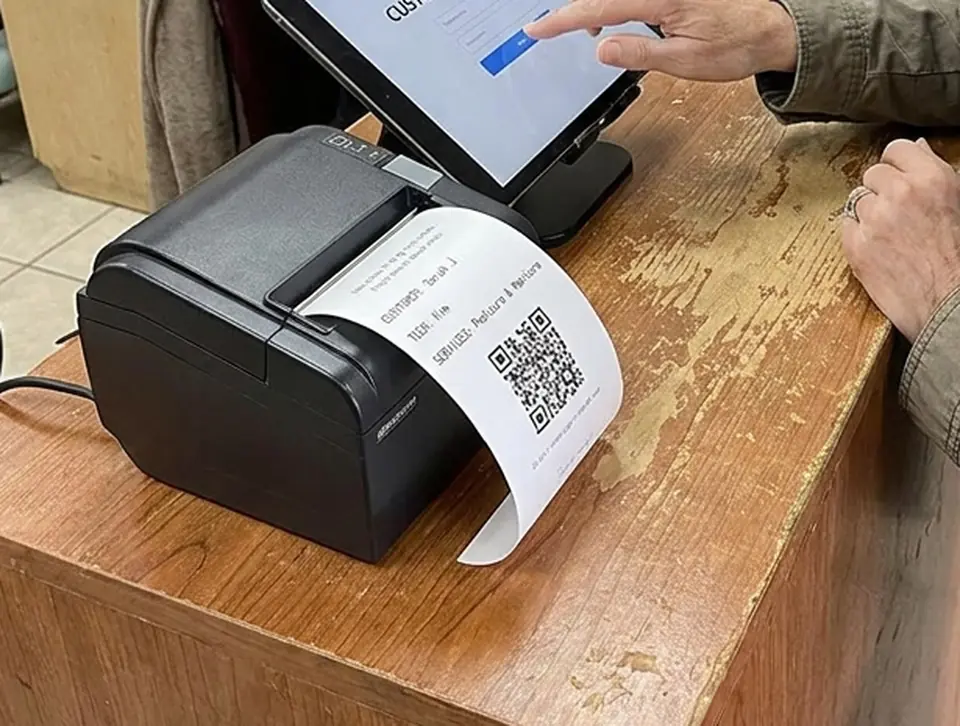
The customer keeps this receipt while receiving services.
At first, printing a receipt before payment may seem like a small detail. But it creates something valuable: a physical connection between the customer's arrival and the eventual checkout. The QR code becomes a quick way to retrieve the visit later.
Once the customer is checked in, the salon can continue with its normal service workflow. The customer doesn't need to remember an account number or explain the visit again later. The check-in information already exists.
This is particularly useful in a busy nail salon where a customer may interact with multiple people during one visit. The person greeting the customer may not be the technician performing the service, and the employee handling checkout may be someone else entirely. A connected system helps carry the visit information through those handoffs.
The biggest benefit of the check-in receipt becomes apparent when the service is finished. The customer returns to the front desk with the receipt.
Instead of starting the checkout conversation with “What's your name?” followed by “Who did your nails?” and “What services did you have?”, the front desk can scan the QR code on the customer's check-in receipt. The associated visit can then be brought into the Astra POS front-desk workflow.
The goal is to reduce searching and repetitive questions while making checkout faster and more accurate. This can be especially helpful during peak checkout periods when several customers finish around the same time.
Walk-in management is often discussed only in terms of waiting to start a service. But customers also wait to pay. A salon may provide a great manicure and still end the experience with an unnecessary line at the register. That matters because checkout is one of the final impressions a customer has before leaving.
Connecting arrival information with checkout can reduce the amount of time employees spend searching for customer records, locating technicians and reconstructing service details. The result is a more continuous experience:
Rather than treating each step as a separate event, the salon can manage the visit as one connected journey.
See how Astra POS connects customer check-in, Client Arrival and front-desk checkout.
Technology shouldn't make the customer experience less personal. It should help employees communicate better.
SMS and text messaging can be particularly useful for salons that manage both appointments and walk-ins. Depending on the salon's workflow, salon text messaging can help with appointment confirmations, reminders and customer communication surrounding the visit.
This becomes even more valuable when customers don't necessarily need to sit in a chair near the front desk while waiting. A salon located in a shopping center, for example, may have customers who prefer to browse nearby stores rather than sit in the waiting area. Keeping customers informed can reduce uncertainty and make waiting feel more manageable.
For scheduled customers, appointment reminders can also help reduce appointment no-shows and keep the day's schedule running more predictably.
A walk-in shouldn't remain an anonymous transaction. Today's walk-in could become one of the salon's best repeat customers.
When customer identification, check-in, service and checkout are connected, the salon can build a more useful customer history. Over time, the business can better understand information such as:
This changes the way a salon can think about walk-in traffic. Instead of asking only, “How many walk-ins did we have today?”, the owner can begin asking: “How many of our walk-ins eventually became repeat customers?” That's a much more valuable business question.
Loyalty shouldn't depend on how someone entered the salon. A customer who walked in without an appointment is still building a relationship with the business.
When the visit is connected to the customer's profile, qualifying purchases can contribute to the salon loyalty program and spending history. This gives the business an opportunity to turn an unplanned visit into a longer-term relationship.
Consider the customer who walks in for a pedicure because she happens to be nearby. She has a good experience. Her visit is recorded. Her spending contributes toward rewards. She later receives relevant communication from the salon. Next time, she may book an appointment instead of simply walking in. That is how a one-time visitor can gradually become a regular customer.
These two concepts are closely connected, but they solve different problems.
Walk-in management focuses on the customer's journey: Who arrived? What do they need? How long have they been waiting? What technician preference do they have? How do we keep them informed?
Technician turn management focuses on staff assignment: Who should receive the next customer? Who is eligible? Who was skipped? Who is on break? How do we keep rotation fair?
A good salon management system should allow these processes to work together without treating them as the same thing. A customer can be properly checked in and placed into the arrival workflow while the salon's rules for fair technician rotation help determine technician assignment. This creates a better balance between customer service and technician fairness.
Software alone cannot eliminate a Saturday rush. The salon still needs good operational habits.
Once the arrival process is digital, it can become useful operational information. Owners can begin looking for patterns.
The purpose of collecting information shouldn't be to create more reports for the owner to read. It should help the owner make better decisions. For example, if Saturday walk-in demand consistently peaks between noon and 3:00 PM, staffing decisions can reflect that reality.
The most valuable part of walk-in management isn't necessarily saving a few minutes at the front desk. It's creating continuity.
A person can enter a salon for the first time without an appointment, check in, choose a service, enter the arrival workflow, receive service, scan the QR receipt at checkout, earn loyalty credit and leave with a customer history established for the future. When that person returns, the salon already knows who they are. That's a very different experience from treating every visit as an isolated transaction.
Astra POS is designed for service businesses where appointments, walk-ins, technicians and customer relationships all intersect. The workflow can connect each stage of the visit so the front desk isn't rebuilding the same information over and over.
Instead of requiring the front desk to repeatedly identify the customer throughout the visit, information captured earlier can follow the customer through the salon workflow. Astra POS also provides SMS and text messaging capabilities that can support appointment communication and customer engagement.
The objective isn't to remove the human element from a salon. It's to remove unnecessary front-desk work so employees can spend more time taking care of people. You can see the wider platform on the nail salon POS and features pages.
Nail salon walk-in management is the process of receiving customers without scheduled appointments, identifying the services they need, managing their waiting experience, coordinating technician availability and moving them efficiently from arrival through checkout.
Yes. A unified arrival process can allow the system to identify whether a customer has an existing appointment or needs to enter the walk-in workflow.
Consistent check-in, early service selection, accurate technician availability, realistic wait expectations and clear customer communication can all help salons manage busy periods more efficiently.
After check-in, a dedicated printer can provide the customer with a receipt containing visit information and a QR code. After service, the QR code can be scanned at the front desk to quickly retrieve the associated visit for checkout.
When the visit is connected to a customer profile and the salon's loyalty program, qualifying activity can be recorded toward the customer's loyalty history just like other visits.
Astra POS supports SMS and text messaging services that can be used as part of customer communication, including appointment-related messaging and other salon communications.
Walk-ins will always involve some unpredictability. That's part of running a busy nail salon. The solution isn't to eliminate walk-ins. It's to build a better system around them.
When customers can check in through a consistent process, the front desk can see arrivals clearly, technicians receive better information, customers can be kept informed, checkout can be accelerated with a QR-coded receipt, and each visit can contribute to customer history and loyalty.
The result is more than a shorter waiting line. It's a smoother experience from the moment the customer walks through the door until the moment they leave — and a better opportunity to turn today's walk-in into tomorrow's regular.
Astra POS builds point-of-sale and salon management software around the way salons actually run — appointments, walk-ins, customer check-in and Client Arrival, technician turn management, client messaging, checkout, payroll, gift cards and loyalty in one system. This article is general operational guidance; text messaging rules and consent requirements vary by jurisdiction and carrier, so confirm current requirements with your provider.
Connect appointments, walk-ins, customer check-in, technician management, SMS communication, checkout and loyalty in one salon workflow.