A POS system is a good fit for a nail salon when it handles walk-ins and appointments in one flow, rotates walk-in clients fairly across technicians, splits tips and calculates commission at checkout, and keeps card-processing costs predictable. Which system is best for you depends on your salon's size, how many of your clients walk in versus book ahead, how you pay technicians, your monthly card volume, and how much support you need.
Quick Comparison of Nail Salon POS Systems
This table shows each provider's published pricing and features. The biggest practical difference for a nail salon is whether the system was built for a walk-in floor with several technicians or for appointment-only service providers.
| System | Software price | In-person card rate | Online booking | Walk-in turn rotation | Payroll & commission | Support |
|---|---|---|---|---|---|---|
| Astra POS | $0 (Astra Free) to $161.10/mo; Pro $49.50/mo | Flat 1.80% for qualifying nail salons | Included (Pro and Max) | Built in (Pro and Max) | Included (Core and up) | 24/7, English, Vietnamese and Spanish |
| Square Appointments | $0, $49 or $149/mo per location | 2.6%, 2.5% or 2.4% + 15¢ (by plan) | Included, including Free | Not found | Square Payroll, $35/mo + $6 per person paid | Phone on weekdays; 24/7 on Premium |
| Clover | $84.95/mo + hardware ($849–$1,899), or $130–$180/mo on a 36-month subscription | 2.3% + 10¢ (Basic plan: 2.6% + 10¢) | Included (Standard and Advanced) | Not found | Payroll integrations, paid add-on | 24/7 |
| Vagaro | $23.99/mo for the first 6 months, + $10 per extra calendar (up to 7) | 2.6% + 10¢ (small merchants) | Included, plus marketplace | Not found | Add-on, $34/mo + $5 per employee | 24/7 |
| GlossGenius | $28–$168/mo ($24–$148 billed annually) | 2.4% + 15¢ | Included | Not found | Add-on, $40/mo + $6 per team member | Phone and text, set hours |
| Mangomint | $120/mo per location + $10 per user | 2.45% + 15¢ | Included | Not found | Add-on, $50/mo + $8 per worker | U.S.-based support (chat) |
Checked October 13, 2026, from each company's official pricing and feature pages (full source list). “Not found” means we could not find a walk-in technician turn rotation on the provider's public pages. It does not mean the feature can't be added through an app or integration, so ask during your demo. Card processing rates shown are each provider's published standard in-person rate; keyed-in and online payments cost more on every system. Astra's 1.80% rate is available to qualifying nail salon merchants, subject to application and approval.
Other systems salon owners often compare include Fresha, Booksy, Boulevard and Meevo. We cover them in our side-by-side comparisons with Fresha, Booksy, Boulevard and Meevo.
Quick picks by salon type
What Makes a POS System Good for Nail Salons?
A retail store sells a product, takes payment and moves on. A nail salon is different. One client can be served by two technicians, wait 25 minutes as a walk-in, add a design mid-service, split her payment, and leave a tip that has to be divided and paid out on Friday. A general retail POS records the sale. A nail salon POS has to run everything that happens around it. These are the features that matter most:
- Technician turn rotation. Assigns walk-in clients fairly using rules you set, so the front desk isn't relying on memory. See nail salon turn management.
- Walk-in check-in. Clients check themselves in by phone number on a tablet, and the system tells walk-ins apart from booked clients. See the salon customer check-in process and walk-in management.
- Appointment scheduling. Technician calendars, service durations, reminders and optional booking deposits help reduce no-shows. See our appointment booking guide.
- Technician payroll and commissions. Commission, hourly pay and tips calculated from each ticket, with tip splitting when several technicians serve one client. See our salon payroll and commission guide.
- Payment processing. Cards, tap-to-pay, mobile wallets, cash and split payments at one checkout, at a rate you can understand. See salon credit card processing.
- Gift cards and loyalty. Sold, tracked and redeemed at the same checkout screen. See gift cards and loyalty programs.
- Customer history. Visit history, preferred technician, colors, notes and gift card balance in one profile.
- Daily and monthly reporting. Sales by technician and service, tips, payment reconciliation and end-of-day totals.
- Owner dashboard. Remote access to sales, payroll and the queue when the owner isn't at the front desk.
- Multi-location management. Shared clients, separate reports and central settings once you open a second salon.
For a deeper look at the day-to-day workflows behind these features, read What Nail Salon Owners Need in a POS and our guide to nail salon management software.
Astra POS — Built Around Nail Salon Operations
Astra POS is the system we build, so we'll be specific about what it does and which plan each feature belongs to. Astra has more than 12 years in the salon industry and serves over 2,000 businesses across the United States. Software plans are Astra Free ($0), Astra Core ($29.95/mo), Astra Pro ($49.50/mo) and Astra Max ($161.10/mo). Paid plans are month-to-month, with no contract. The price is per plan, not per technician (see plan details).
Technician turn queue
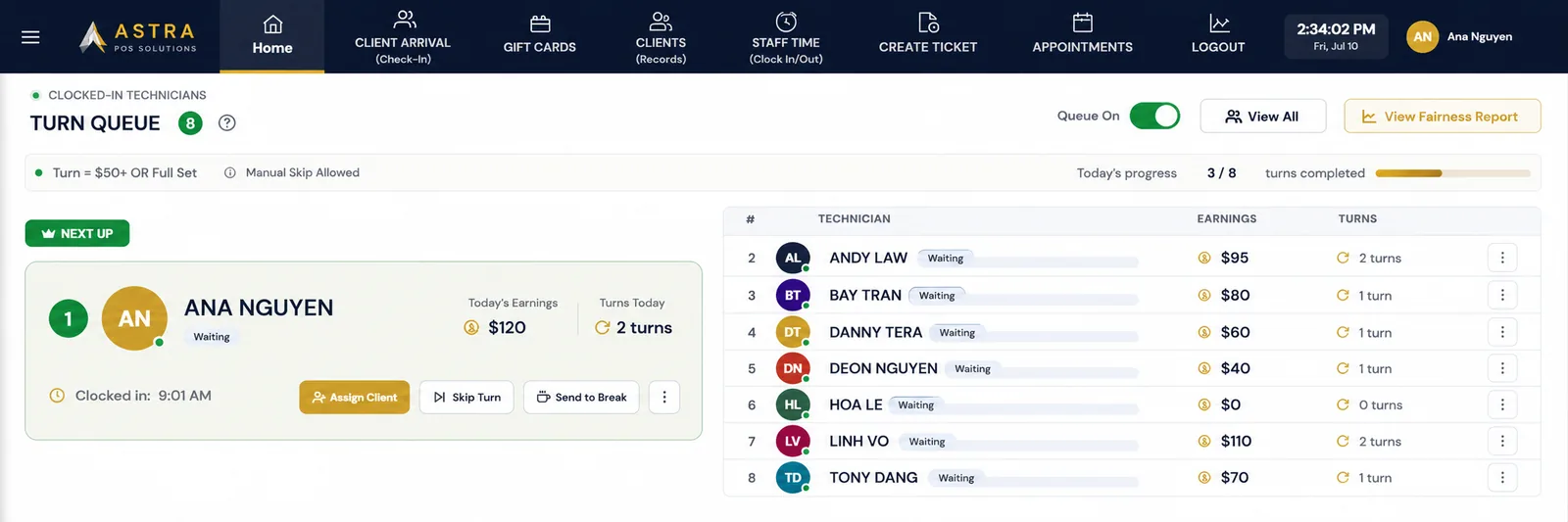
The turn queue shows every clocked-in technician in order. The front desk can see who is Next Up, how many turns each person has had today and what they've earned. Assigning a client, skipping a turn or sending someone on break takes one tap, and a fairness report shows how turns were distributed over the day.
The rules are set by you, not by the software:
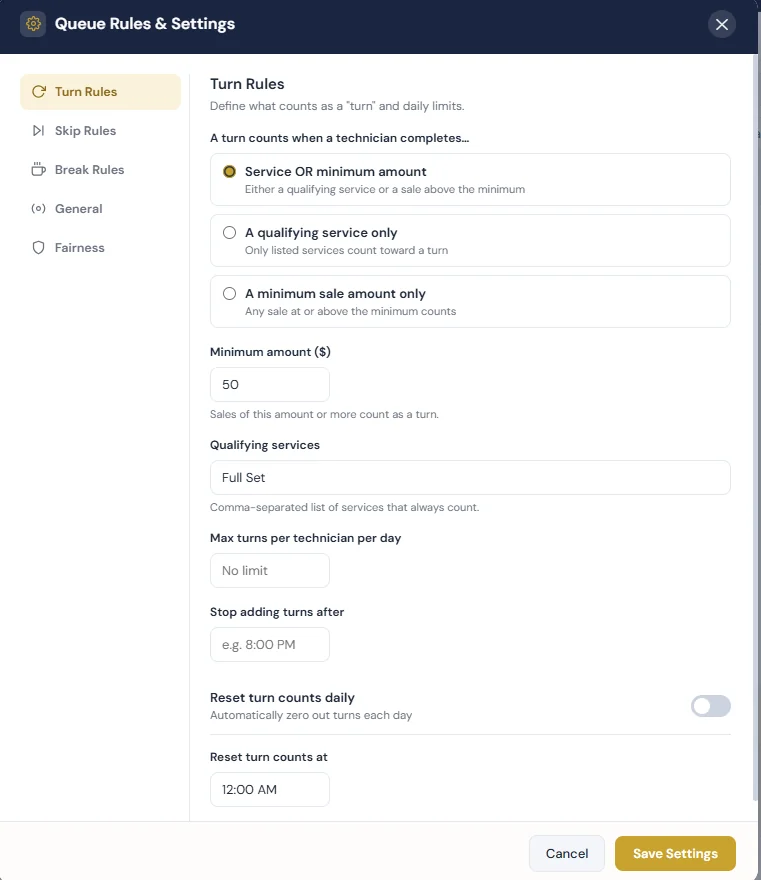
- What counts as a turn: a dollar amount of service, a qualifying service (for example, a full set), or either one. With a dollar rule of $40 per turn, every $40 of service a technician completes counts as one turn, so an $80 pedicure counts as two.
- Who is next: the queue order follows the method you choose. With least earned, Astra tracks each technician's service dollars for the day and puts the technician who has earned the least at the top, then the next lowest, and so on.
- Daily limits: an optional maximum number of turns per technician, a time after which turns stop counting, and an automatic daily reset.
- Skip rules: decide whether a technician who passes on a client keeps their place or moves down the line.
- Break rules: decide whether a technician returning from break goes back to their original position or to the end of the queue.
- Requests: a client who asks for a specific technician is handled separately from general walk-in rotation.
Walk-in and appointment management
Clients check in on a customer-facing tablet by entering their phone number. If they have an appointment that day, Astra recognizes it and shows the booking. Walk-ins enter the walk-in flow, and returning clients' history is ready for their technician. Check-in can also be done at the front desk. Because check-in, the turn queue and appointments are one system, the front desk sees booked and walk-in clients together instead of keeping a calendar and a paper list. A printed check-in receipt with a QR code lets the front desk pull up the visit quickly at checkout. Check-in and turn queue are included in Astra Pro and Max.
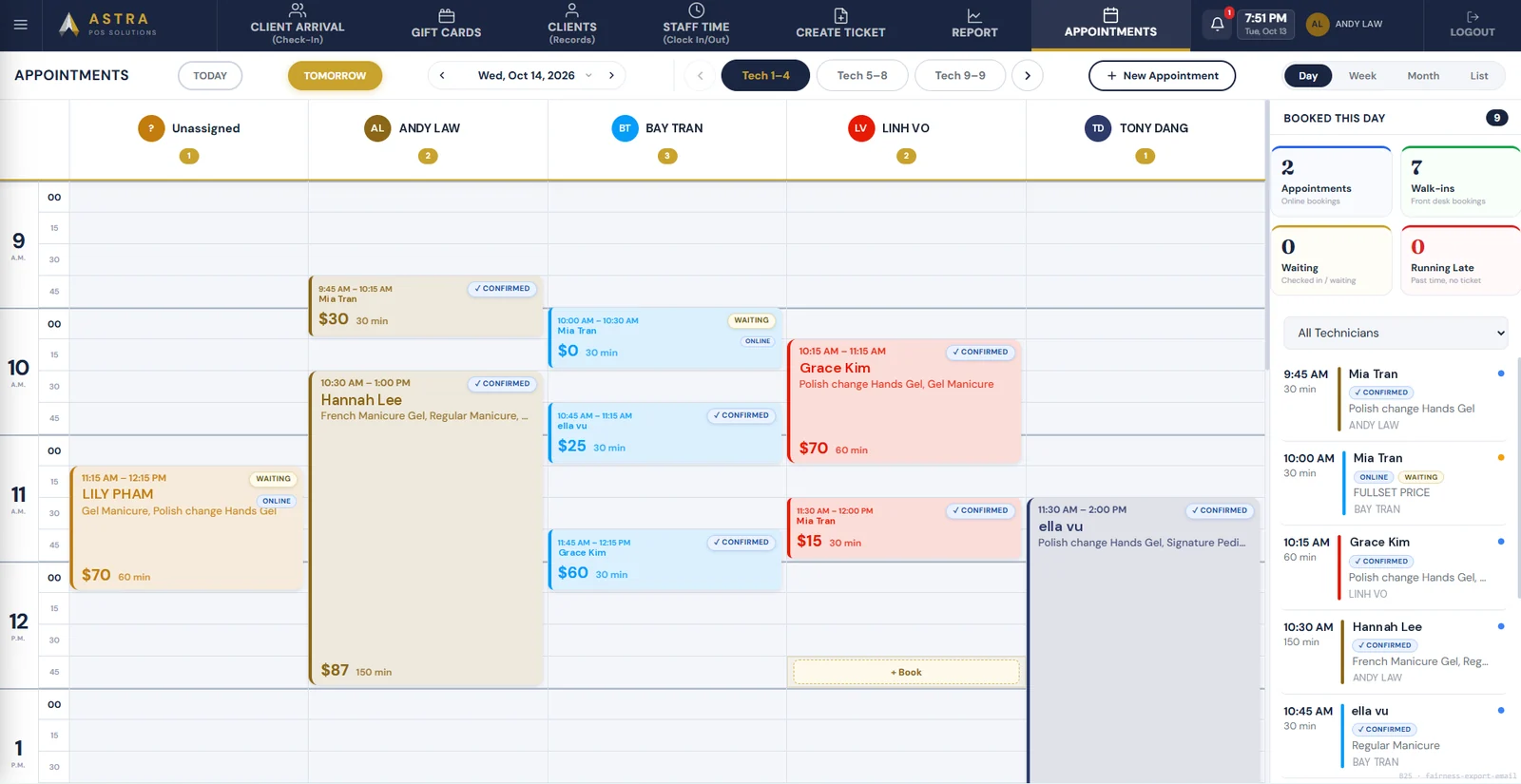
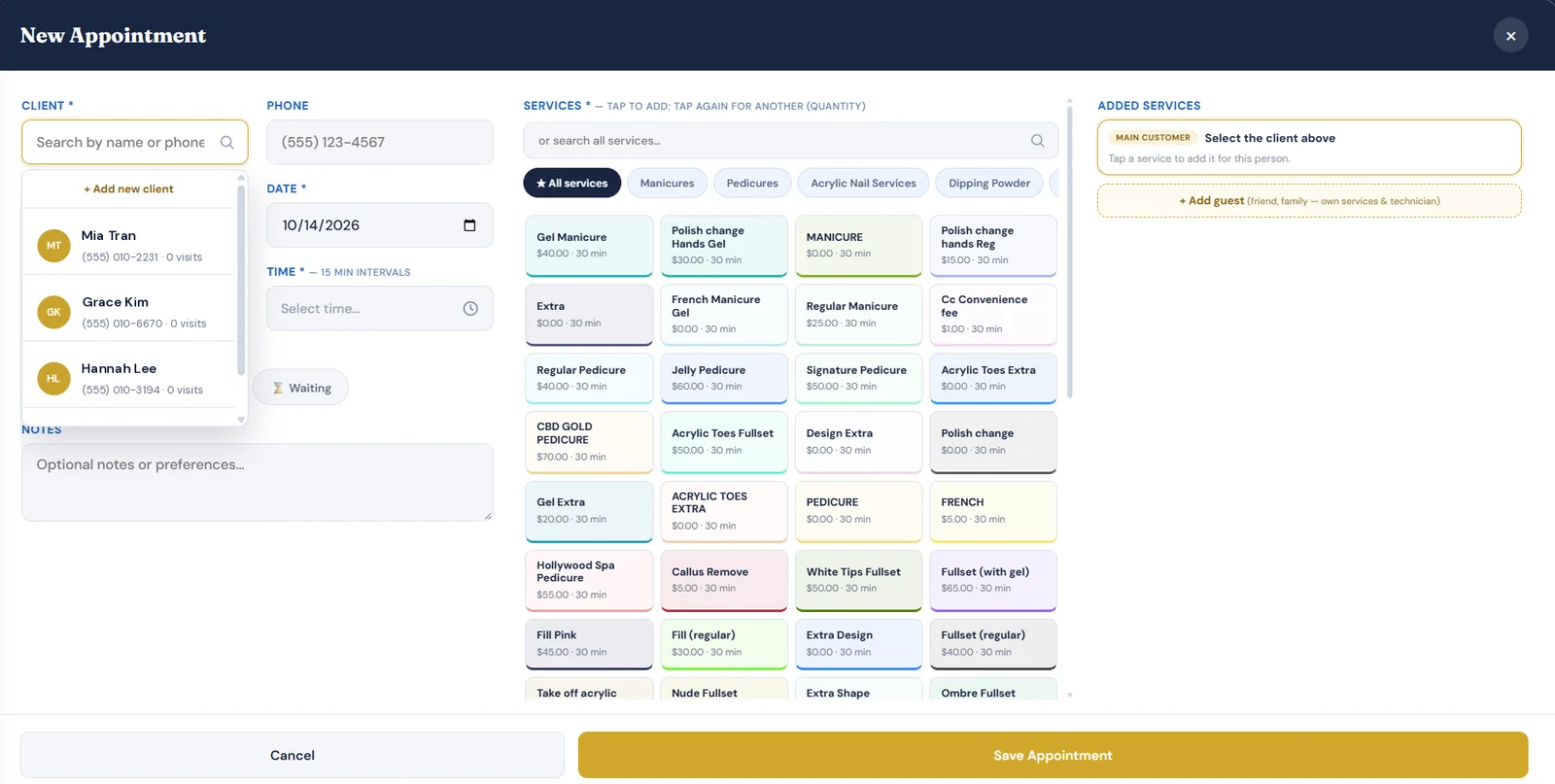
The appointment calendar shows a column for each technician plus an Unassigned column for bookings that don't have a technician yet, such as “First Available”. Online bookings are tagged Online, and each appointment shows its status: confirmed, waiting or running late. A side panel counts the day's appointments, walk-ins, clients waiting and clients running late. The front desk adds bookings from the New Appointment screen. They search the client by name or phone, tap services from the salon's menu (tap again to add quantity), pick a date and time in 15-minute intervals, and add guests such as a friend or family member with their own services and technician.
Customer records and visit history
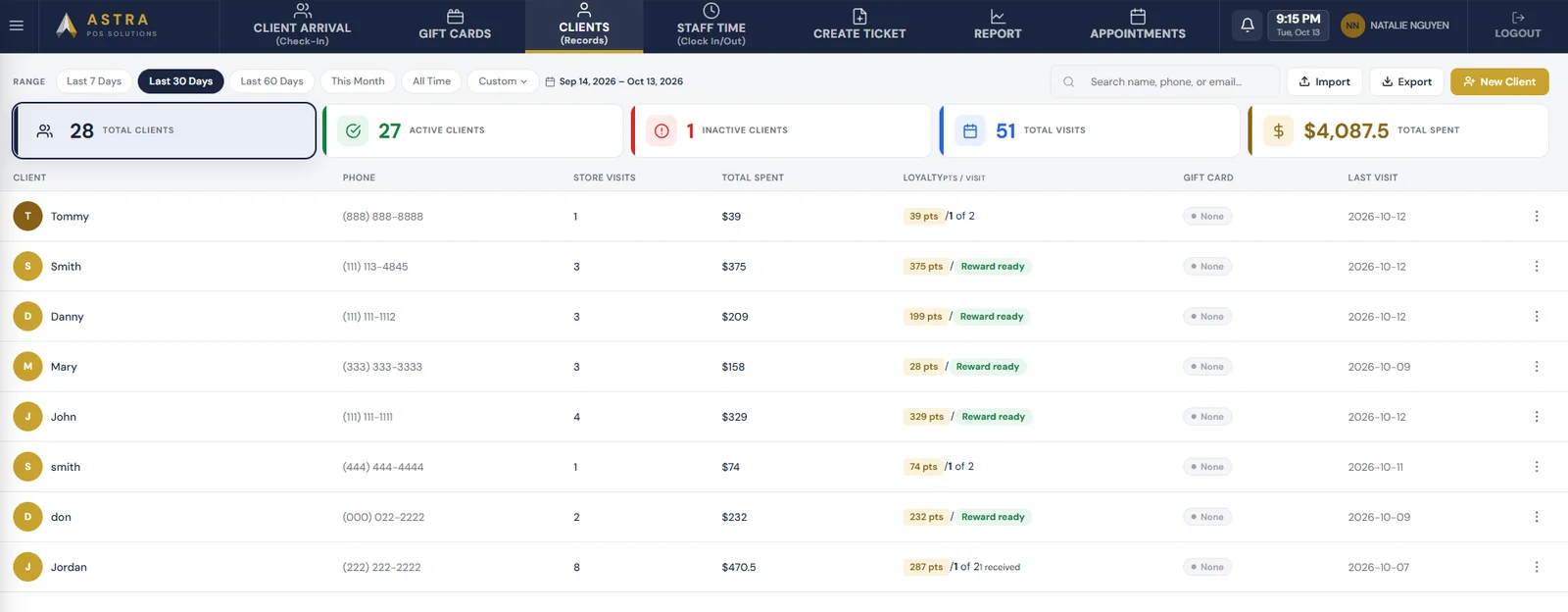
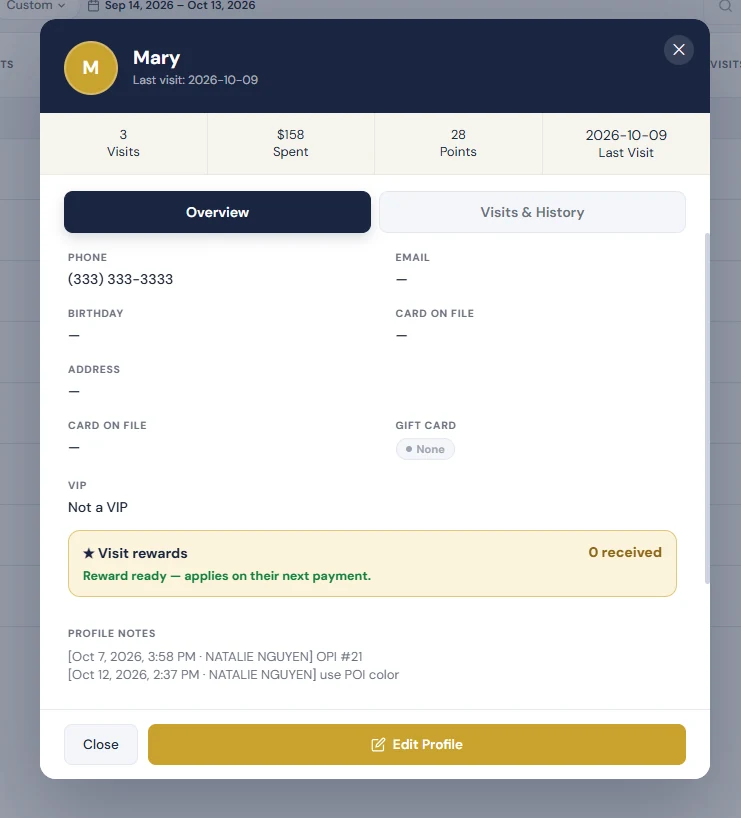
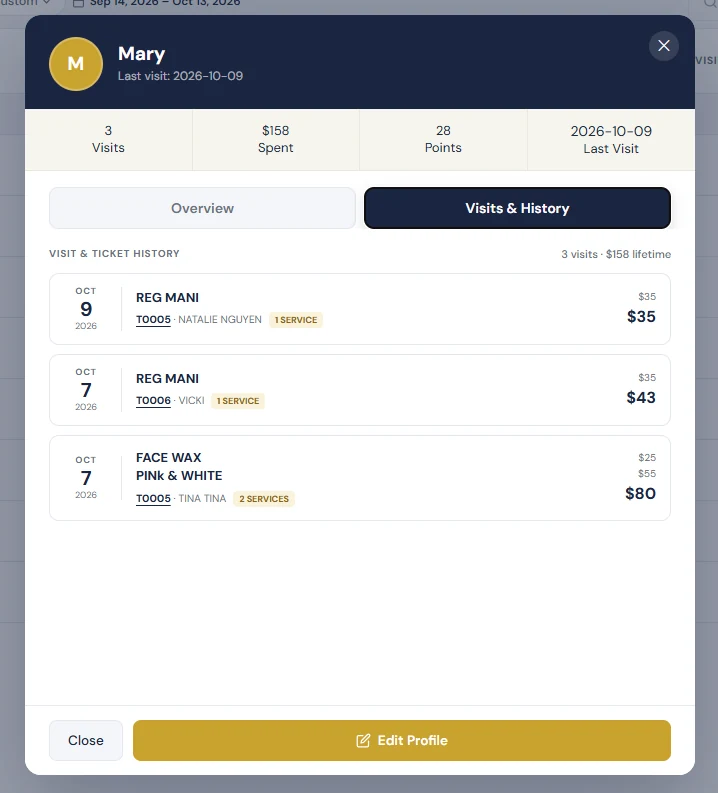
Every client who checks in, books or pays builds a record automatically. The client list shows each person's phone number, number of visits, total spent, loyalty points and reward status, gift card balance and last visit. You can filter it by date range, and summary counts show total, active and inactive clients. Opening a client shows their contact details, birthday, VIP status, visit rewards and dated profile notes, such as a favorite polish color. The Visits & History tab lists every past ticket with the services, technician and amount. Owners can see who hasn't been back and who is close to a reward, so marketing goes to the right people, and technicians know what a returning client had last time. See client management.
Payroll and reporting
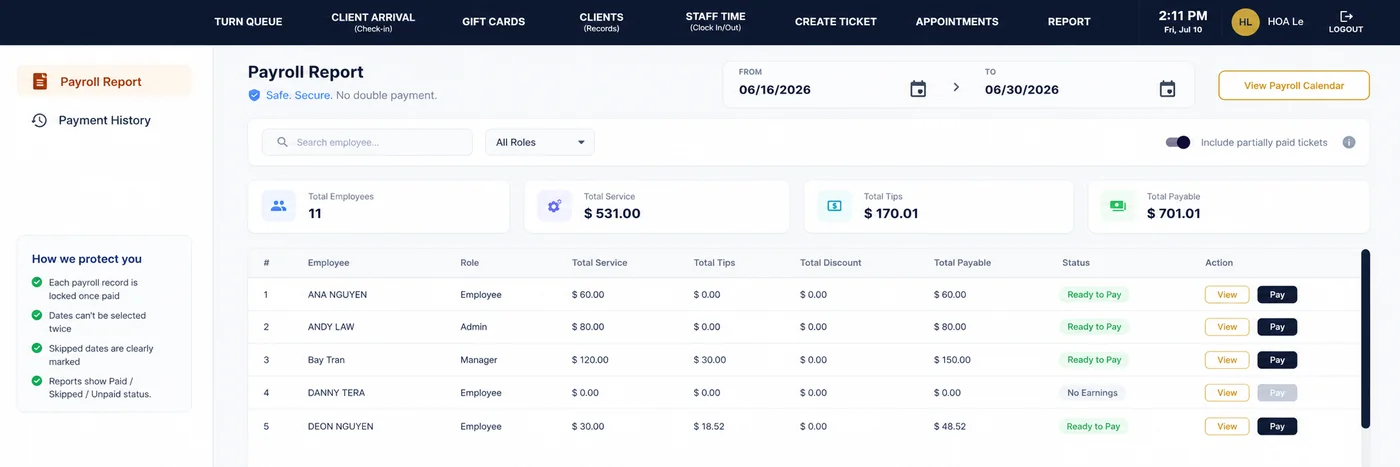
Every ticket records which technicians performed which services and how the tip was divided, so payroll is built from real sales rather than a spreadsheet. The payroll report shows service sales, tips, discounts and total payable for each employee over the pay period. Once a payroll record is paid it is locked, and pay periods can't be selected twice, which prevents double payments. Payroll management starts on Astra Core. See salon payroll software.
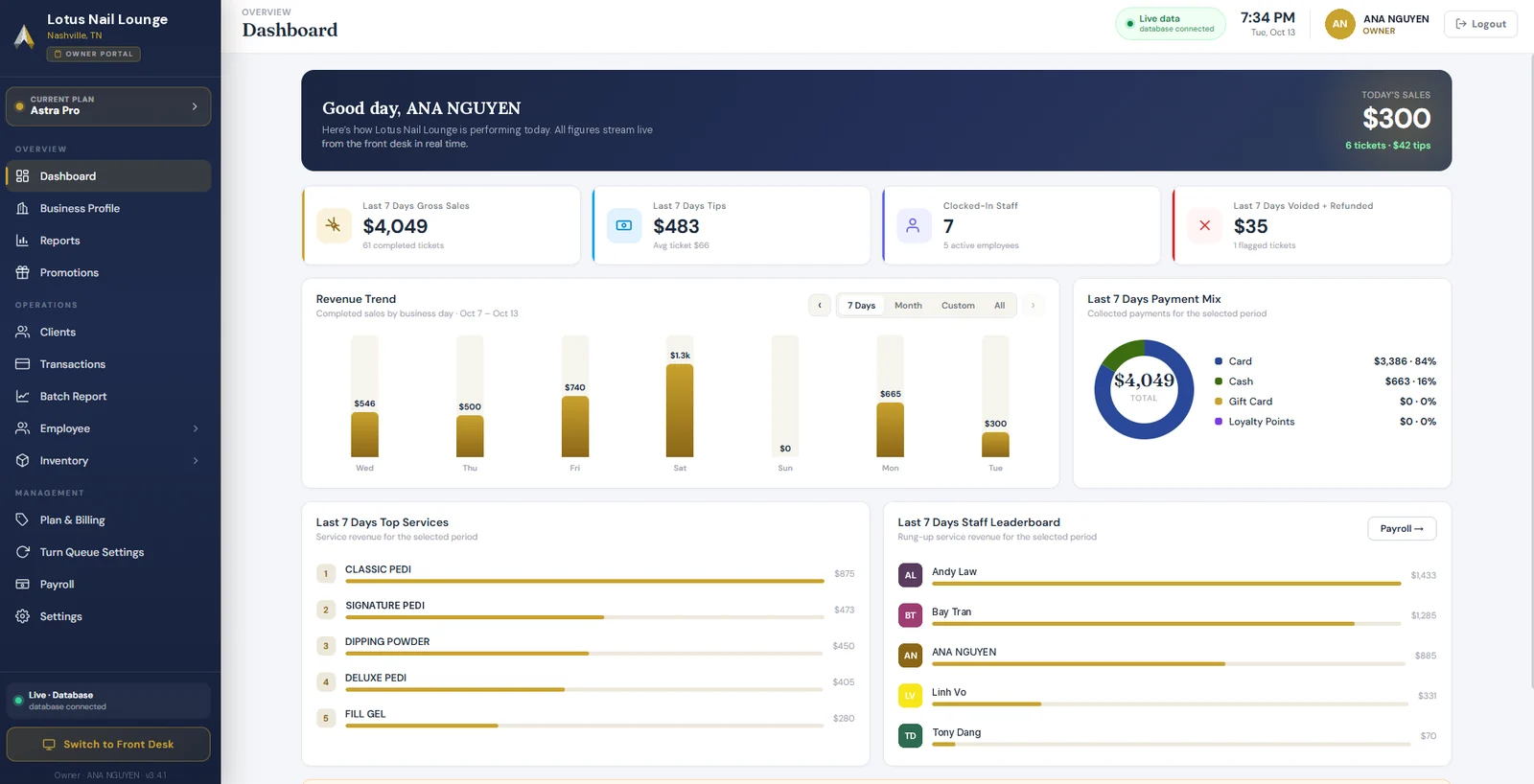
From the owner portal, owners can see today's sales and tips, a revenue trend by business day, the mix of card, cash, gift card and loyalty payments, top services and a staff leaderboard, from anywhere and without standing at the front desk. The same portal holds reports, batch reports, payroll and turn queue settings. Astra Max adds advanced analytics and multi-location management.
Online booking
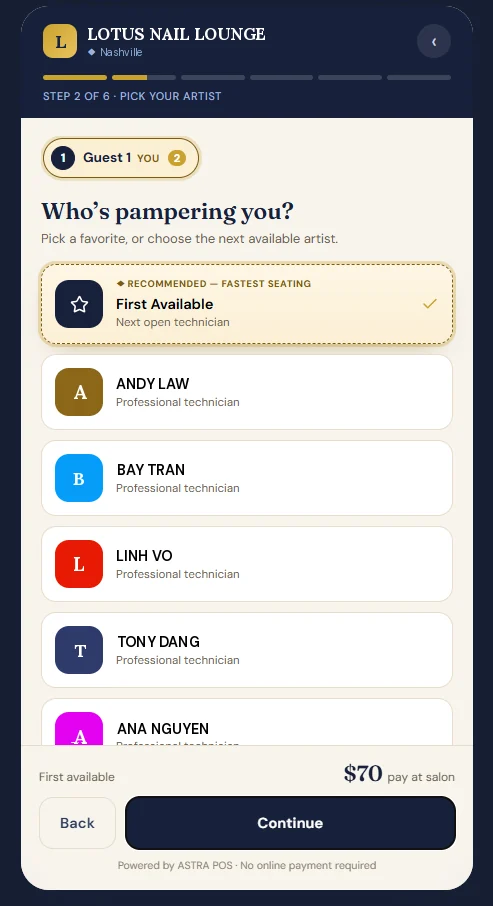
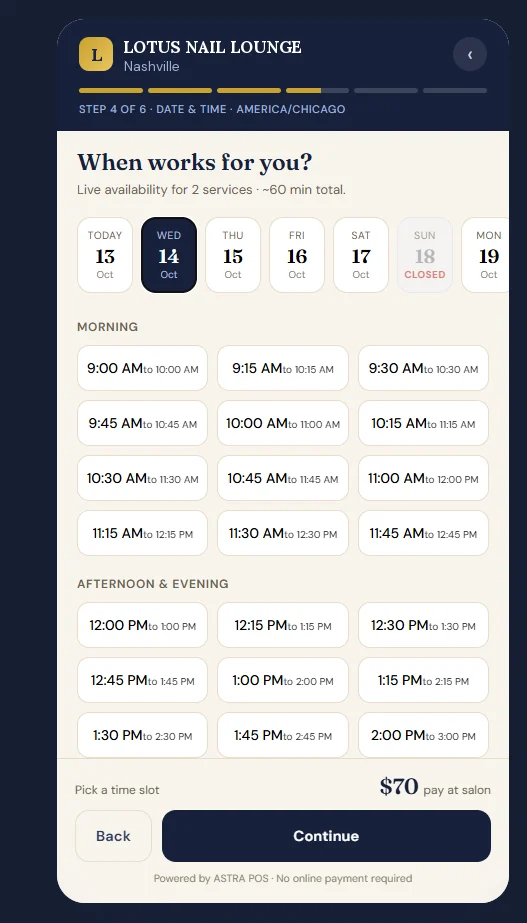
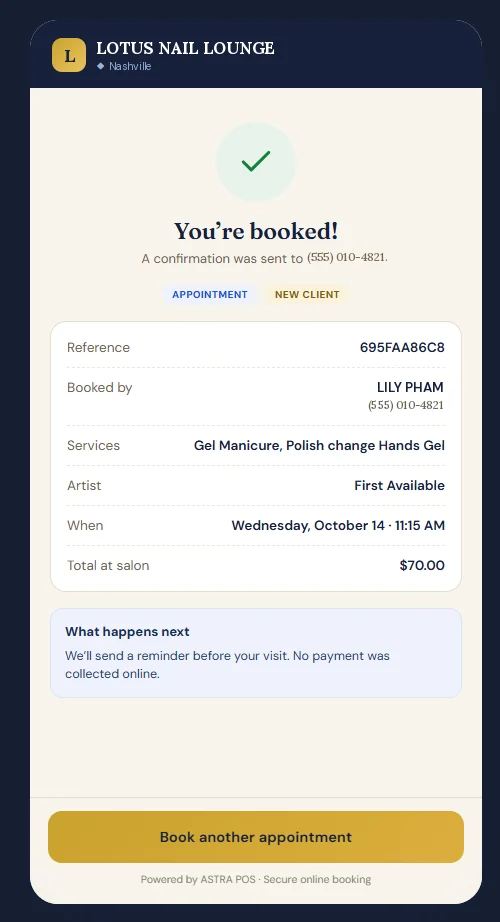
Clients book from their phone in a few short steps. They choose services, add a guest if they're bringing a friend, pick a technician or “First Available,” choose a day and time from live availability, and enter their details. The booking is confirmed right away by text message or email, and a reminder goes out before the visit. Unless the salon requires a deposit for a service, nothing is charged online and the client pays at the salon. Each booking lands on the appointment calendar tagged Online, where staff can confirm, move or reassign it. The same booking link can be shared on your website, Google profile and social media. See how salon online booking works. Online booking is included in Astra Pro and Max.
Integrated payment processing
Astra offers flat-rate processing. You pay one fixed percentage of the card volume you process, and Amex and rewards cards cost the same. There is no statement fee, batch fee or regulatory product fee. For qualifying nail salon merchants, the flat rate is 1.80%, with no additional per-transaction charge, subject to application and approval. A separate $99 annual PCI compliance fee applies. Dual pricing and cash discount programs are also available. See flat-rate processing for nail salons for worked examples and full disclosures.
Free POS software
Astra Free is $0 per month and isn't a trial that expires. It covers creating tickets and taking payment, transaction history, basic reports, a customer list and inventory, for one location, one terminal and one user login. You do need to create an account, but no credit card is required and you don't have to switch card processors. Appointments, online booking, turn queue, payroll, gift cards and loyalty are paid-plan features. If you'd like to try the system before creating an account, the Live Demo needs no signup. See Astra's free POS system.
Bilingual support
Many nail salons in the United States are Vietnamese-owned, and many owners prefer to handle setup, training and support questions in Vietnamese. All Astra plans include 24/7 support in English, Vietnamese and Spanish, and the website can be switched to Vietnamese with the EN/VI toggle.
Square for Nail Salons
Square Appointments is Square's booking product. It's popular with solo technicians and small salons that already use Square for payments.
- Pricing: Free ($0), Plus ($49/mo) and Premium ($149/mo), charged per location. The Free plan includes online booking with unlimited staff calendars.
- Processing: in-person rates of 2.6% + 15¢ (Free), 2.5% + 15¢ (Plus) and 2.4% + 15¢ (Premium). Keyed-in payments are 3.5% + 15¢ on every plan.
- Hardware: Square Reader $59, Square Terminal $299 and Square Register $899, with financing available.
- Salon features: loyalty is included on Plus and Premium, and gift cards are built in. The waitlist (Plus and Premium) fills cancelled appointment slots. It is not a walk-in queue.
- Payroll: Square Payroll is a separate product at $35/mo plus $6 per person paid.
- Support and terms: phone support on weekdays (on the Free plan, for the first 90 days); 24/7 priority support on Premium. No long-term contract.
Things to consider: Square is easy to set up and the Free plan is hard to beat for a one-person business. We did not find walk-in turn rotation on Square's official pages, and payroll is billed separately, so salons with several commission technicians should price the full setup. Astra POS vs Square Appointments →
Clover for Nail Salons
Clover is a POS and payments platform sold directly by Clover and through banks and other partners. Its personal-services plans bundle hardware with software.
- Plans on Clover.com: Basic (Compact terminal, $349 or $16/mo for 36 months), Standard (Clover Mini, $849 plus $84.95/mo, or $130/mo for 36 months) and Advanced (Station Duo, $1,899 plus $84.95/mo, or $180/mo for 36 months).
- Processing: 2.3% + 10¢ in person on Standard and Advanced, and 2.6% + 10¢ on Basic. Keyed-in payments are 3.5% + 10¢.
- Salon features: on Standard and Advanced, appointment booking includes online booking, email and text reminders, no-show fees and Reserve with Google. Gift cards and a customer database are included. Clover's loyalty program is listed as not included in these plans.
- Payroll: available through paid payroll integrations. Other functions are available through the Clover App Market.
- Terms: Clover says its hardware subscriptions are non-cancelable. Contract terms and termination fees vary by who sells you Clover. Clover advertises 24/7 support.
Things to consider: Clover hardware is widely used and well supported. Pricing depends on the reseller, so get the full agreement in writing, including the term length and any early termination fee. Check which nail-salon features (turn rotation, tip splitting, commission payroll) come from Clover itself and which require third-party apps.
Vagaro for Nail Salons
Vagaro is a booking and business platform for salons, spas and fitness businesses. It includes a consumer marketplace where clients can find and book businesses.
- Pricing: $23.99/mo for one bookable calendar, an introductory rate for the first six months. Each additional calendar is $10/mo, up to seven.
- Processing: 2.6% + 10¢ for dip and tap and 3.5% + 19¢ keyed, for small merchants. Vagaro also lists a lower large-merchant rate (2.29% + 19¢ with a $10 monthly fee).
- Salon features: online booking, waitlist, loyalty, gift certificates and advanced reporting are included. A QR check-in app is a $10/mo add-on.
- Payroll: paid add-on at $34/mo plus $5 per employee, with flexible commission structures.
- Support and terms: 24/7 support. Cancel anytime with no cancellation fees (Vagaro notes exclusions apply).
Things to consider: Vagaro offers a lot of features and marketplace exposure. The monthly price rises with each bookable technician calendar, and payroll and check-in are add-ons. Astra POS vs Vagaro →
GlossGenius for Nail Salons
GlossGenius is a booking, payments and branded-website platform aimed at independent beauty professionals and growing studios.
- Pricing: Standard $28/mo, Gold $56/mo (up to 9 staff) and Platinum $168/mo (10+ staff), or $24, $48 and $148 per month billed annually. There's a 14-day free trial and no free plan.
- Processing: 2.4% + 15¢ for dip, swipe or tap, as listed on its pricing page. Instant payouts cost an extra 1.8%.
- Salon features: online booking, client management, marketing tools and built-in gift cards. Automated waitlist on Gold and up; customizable commissions on Platinum.
- Payroll: paid add-on at $40/mo plus $6 per team member paid, run through a payroll partner.
- Support and terms: phone and text support during set weekday and Saturday hours. No contracts.
Things to consider: GlossGenius gives clients a polished, design-forward booking experience. Its tools focus on appointments, and we did not find walk-in turn rotation on its official pages. Astra POS vs GlossGenius →
Mangomint for Nail Salons
Mangomint is a salon and spa management platform with a strong focus on automation and front-desk efficiency for appointment-driven businesses.
- Pricing: one plan at $120/mo per location plus $10 per user (anyone with a profile counts as a user).
- Processing: 2.45% + 15¢ in person and 2.90% + 30¢ for virtual payments. You can use another processor, but some features then won't work.
- Salon features: online booking, Express Booking, a virtual waiting room with self check-in for booked clients, gift cards, memberships, packages and reporting are included.
- Add-ons: payroll is $50/mo plus $8 per worker; phone and text is $70/mo per line; marketing is $30–$300/mo.
- Support and terms: U.S.-based support and free onboarding. No contracts.
Things to consider: Mangomint is a premium choice for appointment-based spas and salons. Per-user pricing and paid add-ons add up for larger teams, and we did not find walk-in turn rotation on its official pages. Astra POS vs Mangomint →
Nail Salon POS Pricing — What Is the True Cost?
The monthly software price is usually the smallest part of what a POS costs. To compare systems fairly, add up:
- Software fees: flat per plan, or charged per location, per user or per bookable calendar. Ask how the price changes when you hire.
- Card processing: usually the biggest ongoing cost. Look at the percentage, the per-transaction fee, keyed-in and online rates, and any monthly or statement fees.
- Hardware: a card terminal, front-desk station or tablet, receipt printer, cash drawer and check-in tablet. Check whether you're buying, leasing or subscribing.
- Add-ons: payroll, texting, marketing, check-in and loyalty are often extra.
- Training and support: what's included, the hours, and whether it's available in your language.
- Contract and cancellation terms: term length, early termination fees, equipment return and whether you can export your client data.
A worked example
Take a salon with 6 technicians plus one front-desk login, $40,000 in monthly card sales and 800 card transactions (a $50 average ticket), paying technicians through the system's payroll. Using each provider's published in-person rate and the plan that covers that team:
| System (plan) | Software | Payroll | Processing | Monthly total |
|---|---|---|---|---|
| Astra POS (Pro) | $49.50 | Included | $720.00 (1.80%)* | $769.50 |
| Square Appointments (Plus) | $49.00 | $71.00 | $1,120.00 (2.5% + 15¢) | $1,240.00 |
| Clover (Standard) | $84.95 | Not published | $1,000.00 (2.3% + 10¢) | $1,084.95 + payroll app |
| Vagaro (6 calendars) | $73.99 | $64.00 | $1,120.00 (2.6% + 10¢) | $1,257.99 |
| GlossGenius (Gold, monthly) | $56.00 | $76.00 | $1,080.00 (2.4% + 15¢) | $1,212.00 |
| Mangomint (7 users) | $190.00 | $98.00 | $1,100.00 (2.45% + 15¢) | $1,388.00 |
*Astra's 1.80% rate applies to qualifying nail salon merchants, subject to application and approval. Astra also charges a $99 annual PCI compliance fee, which isn't included above. This is an illustration, not a quote. It uses published standard rates checked on October 13, 2026, and assumes every card is present (no keyed-in or online payments). It excludes hardware, taxes and add-ons other than payroll. Vagaro's price is its introductory rate for the first six months. Clover's payroll integration price isn't published, so it isn't included. Larger salons may qualify for lower rates from other providers too (Vagaro, for example, lists a large-merchant rate). Your own costs depend on your card mix, volume and the agreement you sign.
Your effective rate is the number to compare between offers: total processing fees ÷ total card sales × 100. For the complete breakdown, see our nail salon POS cost guide, flat-rate processing for nail salons and how to reduce credit card fees. Some salons also lower card costs with dual pricing or a cash discount program.
Why Technician Rotation Matters
In a walk-in nail salon, who gets the next client decides who earns money that hour. When rotation depends on the front desk's memory, every busy Saturday creates arguments: someone was skipped, someone keeps getting the quick polish changes, someone got two pedicures in a row. Those disputes hurt team morale, pull the front desk away from clients and can push good technicians to leave.
A rules-based turn queue removes that guesswork in three ways:
- Fairness everyone can see. The order and each technician's turn count are on screen, so nobody has to rely on memory.
- Faster service. The front desk assigns the next available, qualified technician in one tap, so walk-ins wait less.
- Consistent policy. Skips, breaks, requests and what counts as a turn follow the same rules every day, no matter who is working the desk.
In Astra POS, the queue is connected to check-in and checkout. Arrivals feed the queue, and completed tickets update turn counts automatically. Our guide to nail salon turn management covers how to write turn, skip and break rules, and the turn queue feature page shows how it works in Astra.
How to Choose the Right Nail Salon POS
Narrow your list to two or three systems, then use this checklist in every demo. Ask each vendor to show you a real Saturday, with six walk-ins, three appointments and one split tip, rather than a slide deck.
- Walk-ins: Can it rotate walk-ins by turn, with skip and break rules you control?
- Check-in: Can clients check themselves in, and does the system tell booked clients apart from walk-ins?
- Multiple technicians: Can one ticket include two technicians and split the tip between them?
- Payroll: Does it handle commission, hourly pay and tips? Is payroll included or an add-on?
- Booking: Can clients choose a technician online? Are reminders and deposits included?
- Full monthly cost: What is the total software, payroll, add-on and processing cost for your team size and card volume?
- Processing: What are the in-person, keyed and online rates? Are there monthly, statement, batch or PCI fees?
- Hardware: Are you buying, leasing or subscribing? Does the hardware only work with that processor?
- Contract: How long is the term? Is there a cancellation fee? Can you export your client list if you leave?
- Support: What hours is support available, and in which languages? Who handles setup, data transfer and training?
If you're switching from an older system, our article on what nail salon owners actually need from a POS covers the day-to-day workflows to test, and our guide to switching nail salon POS systems explains how to move your customer list, gift card balances and appointments.
How We Evaluated These Systems
We chose the six providers nail salon owners most often ask us about. For each one, we reviewed the company's own pricing pages, feature pages and help-center articles on October 13, 2026. We did not use third-party review sites for prices or features. We recorded published prices as listed, labeled add-ons separately from included features, and marked a feature “not found” when we couldn't find it on the provider's official pages. Some providers sell through resellers or negotiate custom pricing, so your quote may differ. Astra POS information comes from our own published pricing and product. Astra POS did not receive payment from any provider for this article, and we did not use ratings or reviews.
Sources (checked October 13, 2026)
- Square: pricing, Appointments, hardware, Payroll pricing, waitlist
- Clover: personal services pricing, pricing FAQ
- Vagaro: pricing, hardware and processing, payroll, check-in app
- GlossGenius: pricing, payroll
- Mangomint: pricing, virtual waiting room
- Astra POS: pricing, Astra Free, flat-rate processing