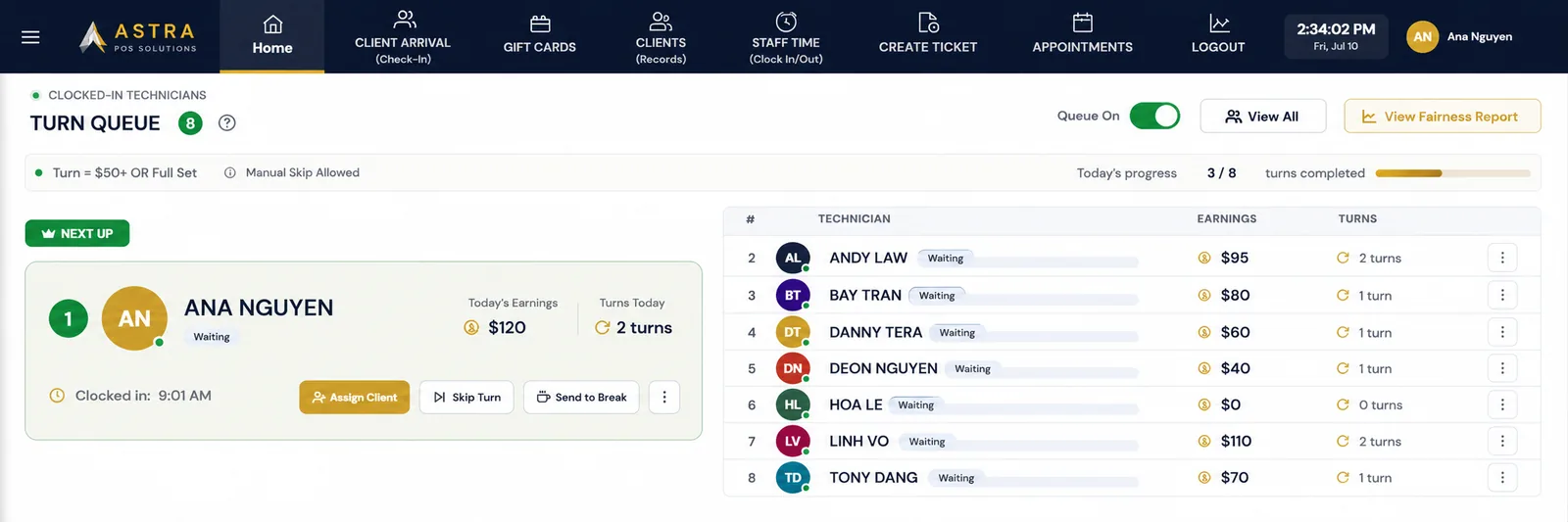
Walk-ins, requests, skips and breaks all hit the same rotation. Here is how a rules-based turn system decides who is next — consistently, and without the front desk playing referee.
Nail salon turn management is a system for fairly distributing walk-in customers and service opportunities among eligible nail technicians. A turn queue tracks who is next, completed turns, skips, breaks, appointments, and salon-defined rules so customer assignments are handled consistently rather than based on memory or favoritism.
Most nail salons do not lose technicians over pay alone. They lose them over the feeling that the good clients keep going to someone else. This guide covers how a technician rotation actually works, what should count as a turn, how to handle walk-ins versus requested appointments, and what to do when someone skips or takes a break.
Rotation matters because in a walk-in salon, the order technicians are assigned clients largely determines what they earn that day. A technician who is passed over twice on a Saturday morning does not just lose two services — they lose the rest of the rush.
When the order lives in the front desk's head, three things tend to happen:
A written, visible rotation does not make everyone earn the same amount. Skill, speed, requests and tips will always differ. What it does is make the opportunity consistent and reviewable, which is what most turn arguments are really about.
A nail salon turn system is an ordered list of technicians who are eligible for the next customer, plus the rules that decide how that list moves. It answers one question all day long: who is next?
A complete nail salon turn system usually tracks:
In Astra POS this lives in the same place as check-in and ticket creation, so the queue is not a whiteboard someone has to remember to update. When a client is checked in and assigned, the rotation moves on its own.
Technician rotation works by placing eligible technicians in a defined order and advancing that order every time a turn is completed. In practice, a shift runs like this:
Clock-in order is the most common way to seed the day's line. The first technician on the floor is first in the queue. Some salons instead start from a fixed roster order or from yesterday's ending position — any of these work, as long as the rule is the same every day.
A walk-in is added to the waiting list with the service they want. If they requested a specific technician, that is recorded at check-in so it can be handled differently from a general walk-in.
The system looks down the list for the first technician who is available and qualified for that service, and assigns the ticket.
When the ticket closes, the service is attributed to that technician for turn counting and for nail salon payroll, tips and commission. The rotation advances to the next person.
The important detail is step 4. If turns are counted by hand and pay is calculated separately, the two records drift apart and you end up arguing about both.
A turn should count when a technician completes work that meaningfully uses their place in the rotation. The hard part is deciding where that line sits, because a $15 polish change and a $75 full set are not the same opportunity.
Salons generally choose one of three definitions:
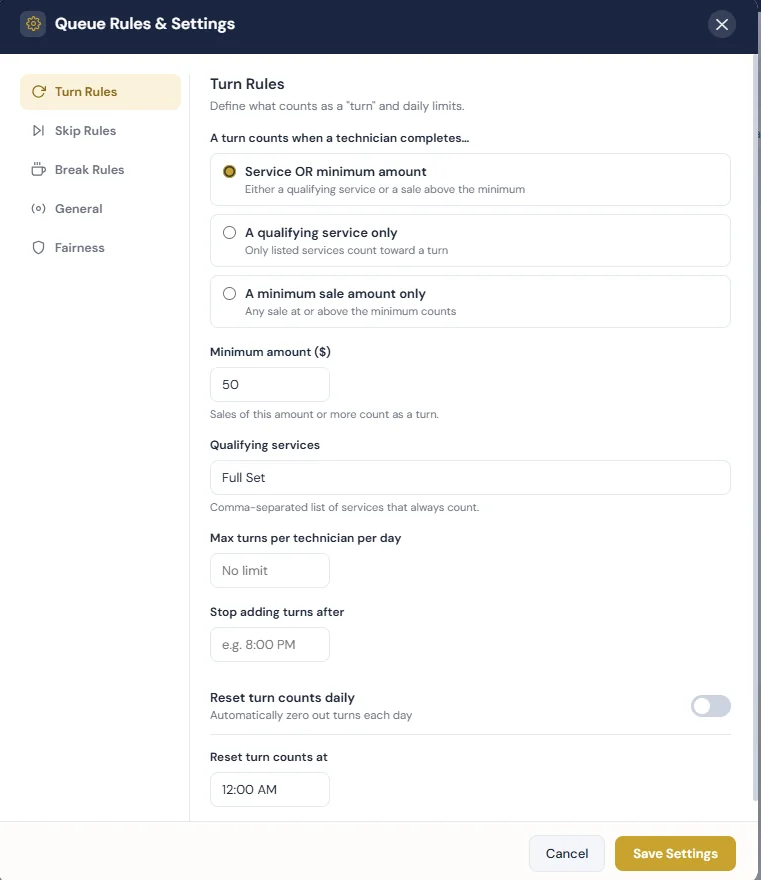
Two supporting settings matter as much as the definition itself:
Dollar-based turns count any sale at or above a threshold. Service-based turns count only specific services. Neither is universally better — they fail in different places.
Setting a minimum such as $50 keeps the rotation tied to real revenue. A technician who takes a $65 pedicure has clearly used their turn. The weakness is time: a $50 ticket that takes ninety minutes and a $50 ticket that takes twenty minutes count identically.
Listing qualifying services ties the rotation to chair time instead of price. This suits salons where the menu is stable and everyone understands which services are "real" turns. The weakness is maintenance — every new service has to be classified, and an expensive service you forgot to list will not count.
"Service OR minimum amount" is the setting most nail salons land on. A qualifying service always counts, and any large ticket counts too, even if it is not on the list. It closes both gaps without asking the front desk to make judgment calls in the middle of a rush.
Walk-ins should be assigned to the first technician in the rotation who is available and qualified for the requested service — not to whoever is nearest the door.
A few rules make walk-in rotation hold up on a busy day:
With a POS system for nail salons handling check-in and assignment together, the walk-in list and the turn queue stay in sync without anyone maintaining a second list.
Rotation decides who takes the client. The customer-facing half of the same rush — arrivals, wait times, updates and checkout — is covered in our guide to nail salon walk-in management.
There is no universal rule for appointments. Salons take one of three positions, and the only wrong answer is not deciding.
Whichever you choose, write it down and apply it the same way every day. Salons that use nail salon appointment booking and online appointment scheduling should also decide how an online booking that did not name a technician is treated — usually the same as an assigned appointment.
When a technician skips a customer, the salon's skip rule decides what happens to their position. There are three common outcomes, and Astra POS lets you configure which one applies:
The distinction worth building into your policy is why the turn was skipped:
Also decide whether skips are logged. A recorded skip turns "you always pass on pedicures" into something you can look at together instead of argue about.
Whether a technician keeps their place during a break depends on your break rule. Astra POS can be configured to return a technician to their original position, move them to the end of the queue, or place them at another predetermined position when they come back.
Questions worth settling before you set the rule:
The goal is not to discourage breaks. It is to remove the negotiation that happens every time someone comes back.
Favoritism is prevented by removing discretion from the moment of assignment. If the rule is defined in advance and the queue is visible, there is no decision left for anyone to make in the moment — and nothing to suspect.
Practically, that comes from four things:
To be clear about what this does and does not do: a turn system creates fair opportunity and a consistent rotation. It does not guarantee that technicians earn equal amounts. Skill, speed, requests, upsells and tips still vary, and they should.
Fairness rules are the balancing settings that sit on top of the basic rotation — the ones that stop a mathematically correct queue from producing a lopsided day.
Typical fairness controls include:
Fairness settings are worth reviewing after a month of real data. A rule that sounds fair in a meeting sometimes produces a pattern nobody intended on a Saturday.
Not every technician should sit under identical rules. A new hire still training, a part-timer working two days a week, and a senior technician with a full book are different situations, and a single global rule handles all three badly.
Employee-level controls typically cover:
These sit alongside the rest of your salon employee management settings, so eligibility, roles and pay setup stay in one place.
Rule for this salon: a turn counts on a qualifying service or a sale of $50+. Requested appointments count. A voluntary skip moves the technician to the end of the queue; a skip for a service they cannot perform moves them down one. Breaks return the technician to their original position if under 15 minutes.
A nail salon turn system organizes technicians into a rotation so walk-in customers and other service opportunities can be assigned consistently and fairly.
A salon may rotate technicians based on clock-in order, completed turns, qualifying services, minimum service amounts, waiting time, or salon-specific rules.
There is no universal rule. Some salons count appointments toward technician turns, while others maintain separate rules for requested appointments and walk-in customers.
The salon can establish a policy that keeps the technician in position, moves the technician to the next position, or sends the technician to the end of the queue. Astra POS allows salons to configure these rules.
Using predefined technician rotation rules creates a consistent process for assigning customers. This reduces reliance on memory or subjective front-desk decisions.
That depends on the salon's policy. Astra POS can be configured to return technicians to their original position, move them to the end of the queue, or use another predetermined position.
Yes. Astra POS allows salons to control technician eligibility and configure employee-specific limits where appropriate.
Astra POS builds turn management into the same system that handles check-in, ticket creation and checkout, so the rotation is never a separate list someone has to maintain. Owners define the rules — what counts as a turn, what a skip costs, how breaks are handled, how the floor is balanced — and the technician turn queue applies them the same way all day.
Because turns are attributed at checkout, the same records feed tips, commission and payroll, and show up in reporting without a second entry. If you want to see how it fits with the rest of the platform, browse the full list of Astra POS features or read our guide to the best POS system for nail salons.
Astra POS develops point-of-sale and salon management technology for nail salons and beauty businesses, including appointment scheduling, technician turn management, payroll, payments, customer management, gift cards, loyalty and reporting.
Astra POS helps nail salons manage walk-ins, appointments, technician turns, skips and breaks using rules established by the salon owner.