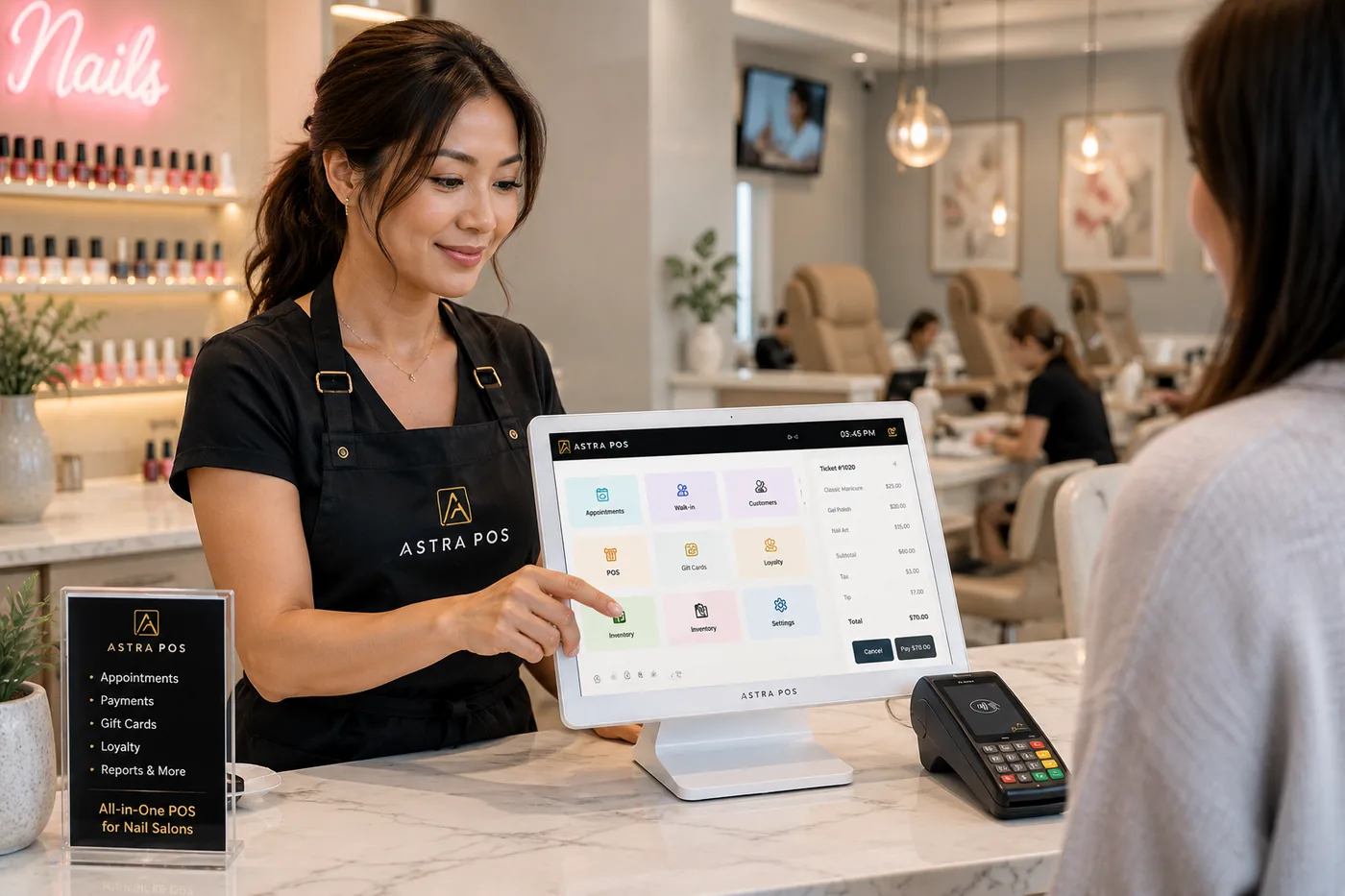
Technician turns, walk-ins, appointments, payroll, reporting, repeat clients and card processing: what a POS has to handle on a real nail salon floor, and what to ask before you choose one.
If you own a nail salon, your nail salon POS system needs to do much more than accept a credit card.
A busy nail salon may have appointments, walk-ins, multiple technicians, technician turns, commissions, tips, payroll, gift cards, loyalty rewards and dozens of transactions happening throughout the day.
That’s why choosing a POS system for a nail salon should start with one question:
Was the system designed around the way a nail salon actually operates?
Astra POS has spent years working directly with nail salons and beauty businesses across the United States, including many Vietnamese-owned nail salons. That experience has taught us that nail salon owners don’t simply need another payment terminal.
They need a system, and a company, that understands their business.
Comparing specific products side by side? Our guide to the best POS systems for nail salons lines up seven options with published prices. This article covers the other half of the decision: what the system has to do once it is sitting on your front desk.
A retail POS has a simple job. Scan the item, take the payment, print the receipt. One cashier, one customer, one sale.
A nail salon doesn’t work that way. One client may see two technicians in a single visit. One ticket may carry a pedicure, a gel manicure and a design add-on, each done by a different person and each paid at a different commission. The tip has to go to the right technician. A walk-in has to be given to whoever is next. Tomorrow’s 10 a.m. appointment still needs its chair.
So a point of sale built for a nail salon has to keep track of things a retail register never sees:
Accepting the payment is one step at the end of all that. If the system only handles that last step, everything before it ends up on paper, in a notebook or in someone’s memory. Our overview of nail salon management software goes deeper on how these pieces connect.
Ask a nail salon owner what causes the most tension on the floor and the answer is usually turns. When walk-ins are a large share of the day, who gets the next client decides how much each nail technician takes home.
When turns are tracked on a whiteboard or from memory, the same problems come up again and again:
A turn system fixes this by making the rule visible and applying it the same way every time.
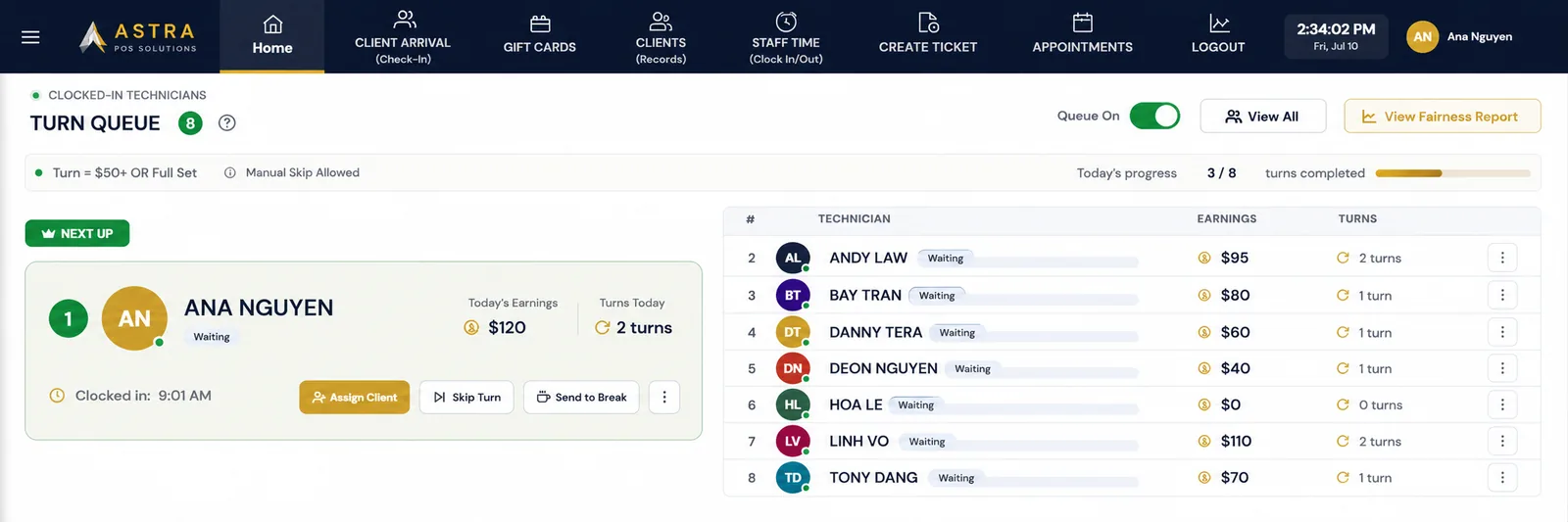
In Astra POS, the Technician Turn Queue shows every clocked-in technician, who is up next, and each person’s turns and earnings for the day. When a walk-in arrives, the front desk assigns the client and the queue updates. Skips and breaks are recorded, so nobody has to remember them.
Salons don’t all rotate the same way, so you choose the rule that fits yours:
You don’t need to master all six. Most salons pick one and stick with it. What matters is that the rule is written down, everyone can see it, and the system follows it. For help choosing the rule itself, read our guide to technician turn management in a nail salon.
Very few nail salons are appointment-only, and very few are walk-in only. Most run both at once. A client with a 2:00 booking walks in behind two walk-ins, and the front desk has to place all three without making anyone feel skipped.
That only works when check-in, the appointment book and the turn queue are one system:

We’ve written about each piece separately: the salon customer check-in process, walk-in management for nail salons, and appointment booking for salons.
Payroll is where many owners lose an evening every pay period. Each technician’s services have to be added up, the commission worked out, tips separated by cash and card, and the numbers checked before anyone is paid.
Your POS already holds almost all of that information, because every ticket records who did the work. A nail salon POS should turn those tickets into what you need on payday:
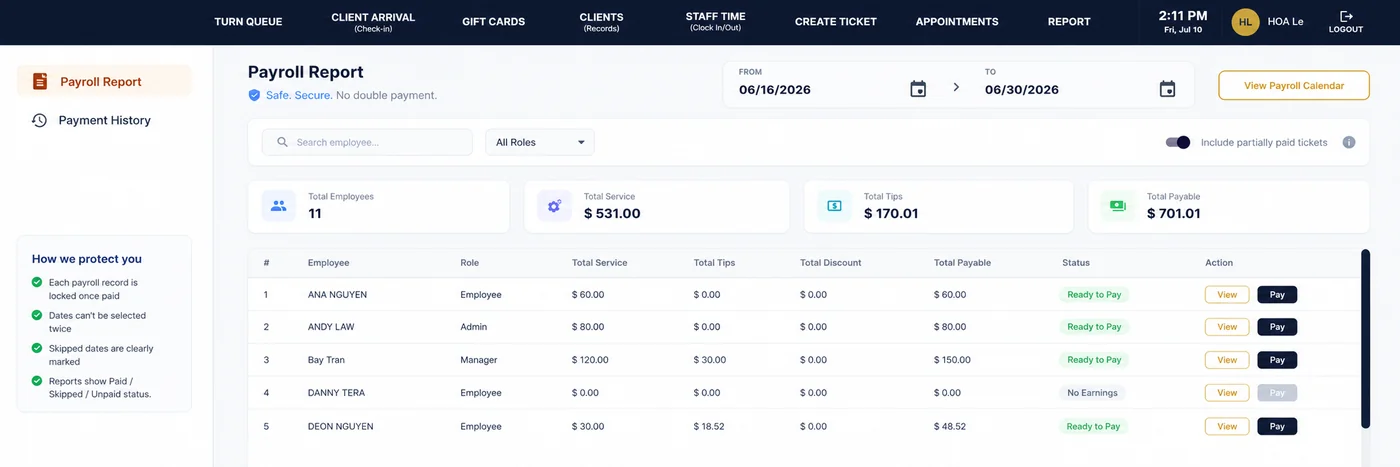
When payroll is built from the tickets, there is nothing to re-enter, and a technician who questions a number can be shown the tickets behind it. Astra POS produces the payroll report and keeps the payment history. You or your accountant still handle tax filings and worker classification. Our salon payroll guide explains commission, hourly and booth-rent arrangements in more detail.
Many owners work on the floor themselves. Others run two locations, or have a family to get home to. Either way, you can’t watch the register all day, and you shouldn’t need to call the salon to find out how the day went.
Good salon reporting lets an owner answer these questions in a minute or two:

Astra POS answers them with end-of-day summaries and sales, payment-type and staff performance reports. Owners sign in to the Astra owner portal from a phone, tablet or computer, so the numbers are available from home, from a second location or from out of town.
A nail salon lives on repeat clients. The client who comes every two or three weeks for a fill is worth far more over a year than a one-time walk-in, and customer retention starts with knowing who your clients are.
Your POS should build that record for you as a side effect of checking people in and out:
More on each of these: how to bring salon clients back, how salon loyalty programs work, and selling gift cards at your salon.
Clients think about booking a pedicure at 10 p.m. on the couch, when your phone isn’t being answered. Online booking lets them finish the job right then.
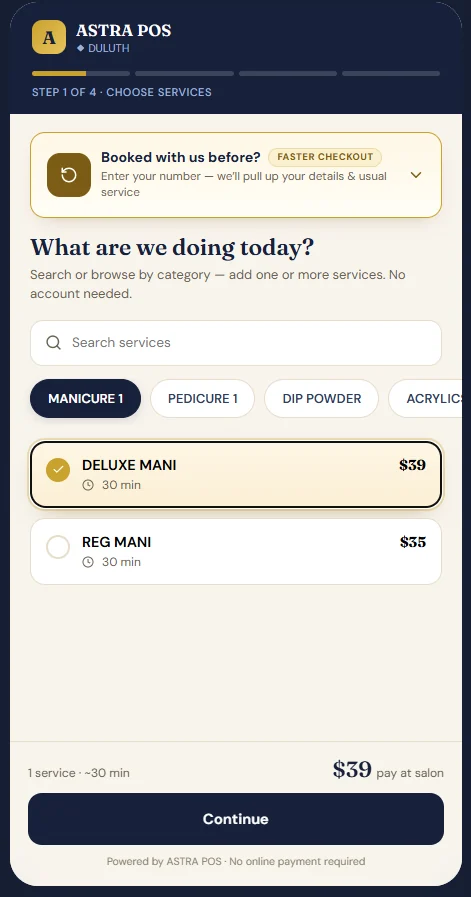
For a nail salon, it helps in four ways:
With Astra POS, clients book from a link you can put on your website, Google Business Profile and social pages. See how salon online booking works, step by step.
Most nail salon owners can’t tell from their statement what they really pay to accept cards. There is one rate for debit, another for credit, another for rewards cards, a per-transaction fee, and a list of monthly fees underneath. Astra’s nail salon payment processing offer is built to be the opposite of that.
For qualifying nail salon merchants on this program
The 1.80% flat rate is available to qualifying nail salon merchants and is subject to application and approval. Not every salon will qualify. Your rate and terms are confirmed in writing before you sign up. Items billed separately from the rate, including the annual PCI compliance fee, are listed in the flat-rate processing disclosures.
Square is one of the best-known names in card processing, and its pricing is public, so it makes a useful reference point. On its Free plan, Square publishes a card-present rate of 2.6% + 15¢ for each tap, dip or swipe.
Here is what that looks like for a nail salon processing $50,000 a month in cards with an average ticket of $50, which is about 1,000 transactions.
Example is for illustration only and assumes $50,000 in eligible card-present volume spread across 1,000 transactions. Actual processing costs depend on transaction types, merchant qualifications, card mix, processing agreement and other applicable terms. Competitor pricing may change. Verify current rates before making a purchasing decision. Square rate shown is the published U.S. Square Free in-person rate as of October 6, 2026; Square’s paid plans and online or keyed-in payments are priced differently. The Astra figure does not include the annual PCI compliance fee described in the disclosures.
Enter your monthly card volume to see the Astra estimate. Add your average ticket if you’d like the Square comparison too. Square charges 15¢ on every transaction, so the comparison isn’t accurate without it.
Add your average ticket to compare with Square Free.
Estimates only, for eligible card-present volume. Astra’s 1.80% applies to qualifying nail salon merchants and is confirmed in writing; items billed separately are in the disclosures. Square figures use its published Free plan in-person rate as of October 6, 2026.
| Monthly card volume | Astra at 1.80% |
|---|---|
| $20,000 | $360 |
| $50,000 | $900 |
| $75,000 | $1,350 |
| $100,000 | $1,800 |
If you’d like to understand your current statement first, start with our salon credit card processing guide, then read how to reduce credit card fees and why many salons overpay for processing.
Send us a recent processing statement. We’ll go through it with you line by line and show you what the same month would have cost at a flat rate.
Software doesn’t set itself up. Someone has to enter the service menu, set each technician’s commission, decide how turns will count, connect the card terminal and show the front desk how to check a client in. In an independently owned salon, that someone is usually the owner, after closing.
This is where a lot of POS purchases go wrong. The system could do what the salon needed. Nobody sat down with the owner to set it up that way.
At Astra, we work with salon owners one-on-one. Before a salon goes live, we talk through how it actually runs:
Then we set the system up to match, train your team, and stay reachable afterward. When a technician asks why her number looks different this week, you should be able to call a person who knows your salon and get an answer.
A large share of the nail salons in the United States are Vietnamese-owned, and the industry as we know it was built in large part by Vietnamese American families. Many of the salons Astra works with every day are part of that community, and it has shaped how we build and support our product.
In practice, that means:
We’re careful not to assume that every salon runs the same way, because they don’t. But when an owner is looking for a Vietnamese nail salon POS, what she is usually asking is simple: will this company understand my salon, and can I talk to them? With Astra, the answer to both is yes.
Take this list to every demo. If a salesperson can’t show you an item working on screen, ask how the salon would handle it.
Opening a new salon and working through everything at once? Our guide on how to open a nail salon covers licensing, build-out and equipment alongside the POS decision.
Follow one client through a visit and you can see how many steps happen before and after the payment. A nail salon POS system earns its place when every one of these steps hands off to the next without anyone writing something down twice.
That is the idea behind Astra POS: salon-specific software, simple processing, hands-on support and people who understand nail salons because they work with them every day.
Tell us how your salon runs today and we’ll give you a straight answer on where Astra fits. We can review:
The best POS system for a nail salon is one built around how the salon runs, not only how it takes payments. Look for technician turn management, walk-in and appointment handling, commission and payroll reporting, tip tracking and customer history in one system. Then compare processing cost and the support you will get after you sign up.
A nail salon POS should include technician turn rotation, online booking, walk-in management, client check-in, payroll and commission reporting, tips, daily and monthly reporting, loyalty, gift cards and customer management. Remote owner access and employee permissions matter too, especially if the owner is not at the salon every day.
A turn system is most useful when a salon takes walk-ins and has several technicians sharing them. It shows who is next, records each turn, and applies the same rule to everyone, which reduces confusion and arguments. A solo technician or an appointment-only salon may not need one.
Yes, to a point. Astra POS uses the services and tips recorded on each ticket to calculate technician production, commissions and tips for the pay period you choose, tracks hours from clock-in and clock-out, and keeps a payment history. Tax filing and worker classification remain the owner’s and accountant’s responsibility.
Yes. Clients can book from a link on your website, Google Business Profile or social pages, choosing the service, technician and time. The appointment goes straight into the same schedule your front desk uses, including bookings made after hours.
Yes. Astra POS works with many Vietnamese-owned nail salons and offers support in English and Vietnamese, along with hands-on setup and training for owners and technicians.
It depends on the provider and the pricing plan. Astra POS offers qualifying nail salon merchants a flat 1.80% rate, so $50,000 in monthly card volume costs $900 in processing. As a reference point, Square’s published Free plan rate is 2.6% + 15¢ per in-person transaction as of October 6, 2026. Provider pricing varies and changes, so compare current rates against your own statement.
Astra POS publishes this article, and Astra POS is our product. The processing figures are examples for illustration. The 1.80% flat rate is offered to qualifying nail salon merchants, is subject to application and approval, and is confirmed in writing before you sign up.
This article is general information, not legal, tax or financial advice.
Sources (reviewed October 6, 2026; pricing changes, so check for updates):
Turn queue, check-in, booking, payroll, reporting and flat-rate processing in one system, set up with you by people who know nail salons.